
أنت تعرف كيف يمكن لانقطاع التيار الكهربائي "البسيط" أن يتحول إلى سلسلة فوضوية من ردود الفعل، وملفات تالفة، وجلسات VPN مقطوعة، ومعدات تعود للعمل بترتيب خاطئ.
ولهذا السبب فإن اختيار الخيار الصحيح مزود الطاقة غير المنقطع (UPS) تُعدّ البنية أهم من اسم العلامة التجارية الموجود على اللوحة الأمامية.
جميع أنواع الترقيات الاحتياطية، والترقيات التفاعلية عبر الخط، والترقيات ذات التحويل المزدوج عبر الإنترنت تحافظ على التيار المتردد تتدفق المياه أثناء الأزمات، لكنهم يفعلون ذلك بطرق مختلفة، مع مقايضات مختلفة في وقت التحويل., جودة الطاقة, والتكلفة.
فيما يلي، سأقارن بين أنظمة الحماية من زيادة التيار الكهربائي., بطارية احتياطية, ، وأدوار العاكس والمقوم، وحالات الاستخدام الواقعية للشبكات المنزلية والمكاتب الصغيرة ورفوف الخوادم ومراكز البيانات حتى تتمكن من اختيار جهاز UPS يناسب تطبيقك.
هل تريد معرفة المزيد؟
النقاط الرئيسية
- أفراد الاستعداد (يسمى أيضًا) غير متصل بالإنترنتيُعدّ خيارًا اقتصاديًا للأحمال منخفضة الطاقة. وتتحول العديد من الطرازات إلى استخدام البطارية تلقائيًا. 6-8 مللي ثانية ويمكن استخدام نطاق محاكاة موجة جيبية على البطارية، وهو أمر قد يكون مهمًا لمزودات الطاقة الخاصة بأجهزة الكمبيوتر ذات تصحيح معامل القدرة النشط.
- تفاعلي عبر الخط يضيف منظم الجهد التلقائي (AVR) للتعامل مع الاستخدام اليومي تقلبات الجهد مع عدد دورات شحن بطارية أقل. إنه خيار مثالي لخزائن الشبكة ورفوف الفروع التي يقل حجمها عن حوالي 5000 فولت أمبير, ، وذلك حسب نوع الدائرة الكهربائية ونوع القابس.
- زيادة التحويل المزدوج عبر الإنترنت يُنتج أنقى مخرجات. يستخدم نظامًا مستمرًا أنظمة التحويل المزدوج (مقوم إلى تيار مستمر، عاكس إلى تيار متردد) لـ وقت نقل صفر وكامل تكييف الطاقة, ولهذا السبب تراه في مراكز البيانات وغيرها من البيئات الحيوية.
- اختر الحجم المناسب: قم بمطابقة الواط والفولت أمبير، وتأكد من المقابس الخاصة بك (تصل العديد من التركيبات في الولايات المتحدة إلى حد القابس قبل حد الفولت أمبير)، واختر وقت التشغيل بناءً على ما تحتاج إلى القيام به فعليًا أثناء انقطاع التيار الكهربائي (التشغيل المستمر، أو الإغلاق الآمن، أو إبقاء الخدمات قيد التشغيل).
- عمر البطارية عنصرٌ أساسي في التخطيط، وليس مفاجأة. فالحرارة والتفريغ العميق المتكرر يُقصران من عمرها، لذا فإن الموقع واستراتيجية الصيانة جزءٌ من قرار تصميم الشبكة.
نظرة عامة على أنواع أنظمة تزويد الطاقة غير المنقطعة (UPS) الثلاثة
هناك ثلاثة أنواع رئيسية من أنظمة UPS التي ستصادفها: وضع الاستعداد، والتفاعل مع الخط، والتحويل المزدوج عبر الإنترنت.
كل واحد منها يغير كيفية استقبال الواردات التيار المتردد يصل إلى حمولتك، عندما تعتمد شركة UPS على بطارية احتياطية, ومدى فعاليته في معالجة الانخفاضات والارتفاعات المفاجئة والضوضاء وانحراف التردد.
في الولايات المتحدة، تتمثل إحدى الطرق العملية للتفكير في تصميم الشبكة الكهربائية فيما يلي: إذا ظل استهلاك الطاقة في مبناك قريبًا من المستوى الاسمي في معظم الأوقات، فيمكنك غالبًا تحسين التكلفة ووقت التشغيل. أما إذا كنت تواجه بانتظام حالات انخفاض الجهد، أو امتدادات طويلة للمغذيات، أو أعطالًا في المولد، فيجب عليك تحسين تنظيم الجهد وتكييفه. وللتوضيح، فإن إرشادات ANSI C84.1 للخدمة العادية بجهد 120 فولت (النطاق أ) هي من 114 فولت إلى 126 فولت, لذا فإن الانخفاضات المتكررة تحت هذا النطاق هي دليل على أن نظام AVR أو التحويل المزدوج سيغطي تكلفته من خلال تقليل الانقطاعات.
ما الذي يتغير فعلياً داخل جهاز UPS؟
- وضع الاستعداد (غير متصل بالإنترنت)تقوم شركة الكهرباء بتغذية الحمل في التشغيل العادي، ثم يقوم مفتاح التحويل بنقل الحمل إلى العاكس أثناء انقطاع التيار الكهربائي.
- تفاعلي بالخطوطلا تزال المرافق تغذي الحمل، ولكن محول الجهد الإلكتروني (مفاتيح خفض ورفع الجهد AVR) تصحح العديد من حالات انخفاض وارتفاع الجهد دون الحاجة إلى التحويل إلى البطارية.
- عبر الإنترنت (تحويل مزدوج): يقوم المقوم والعاكس بمعالجة الطاقة بشكل مستمر، مما يعزل الحمل عن العديد من الأعطال في المنبع ويحافظ على التحكم الدقيق في الإخراج.
معظم الشركات المصنعة ذات السمعة الطيبة، بما في ذلك إيتون, قم بدمج هذه التكوينات مع مكونات الحماية من زيادة التيار، ومرشحات التداخل الكهرومغناطيسي، وميزات المراقبة. تظهر الاختلافات في جودة شكل موجة الإخراج، ووقت النقل، ومعدل دورات شحن البطارية، ومدى إمكانية التنبؤ بوقت التشغيل تحت الضغط.
إذا كنت تهتم بالبنية التحتية الحساسة لتكنولوجيا المعلومات، فلا تخلط بين "الحماية من ارتفاع التيار" و"تنظيم الطاقة". فالحماية من ارتفاع التيار تكبح الارتفاعات المفاجئة الكبيرة، بينما يعالج تنظيم الطاقة أيضًا الانخفاضات والتشويش والضوضاء التي قد تتسبب في تعطل الأجهزة دون أن تبدو كارتفاع مفاجئ حاد في التيار.
إذا كنت تجري الطاقة المتجددة أو الأنظمة الهجينة التي تشمل جهد التيار المستمر عند اختيار مصادر الطاقة، يجب إيلاء اهتمام أكبر لتصميم مدخلات وشحن وحدة UPS. بعض التركيبات تُناسبها أنظمة ناقل التيار المستمر أو أنظمة المقومات المخصصة بشكل أفضل، بينما تتألق تصميمات UPS التقليدية للتيار المتردد كحلقة وصل أخيرة بين الشبكة الكهربائية والحمل.
وضع الاستعداد (غير متصل) UPS
يقوم جهاز UPS الاحتياطي بتزويد أجهزتك بالطاقة الكهربائية مباشرةً من الشبكة حتى ينخفض جهد الإدخال عن النطاق المقبول أو ينقطع التيار الكهربائي. عندئذٍ، يقوم مفتاح التحويل بتحويل الحمل إلى العاكس والبطارية.
هذا هو التكوين الأكثر شيوعًا لأجهزة الكمبيوتر المكتبية، أو الشبكات المنزلية الصغيرة، أو محطات العمل الفردية التي تحتاج فقط إلى الطاقة الاحتياطية لفترة كافية لحفظ العمل وإغلاق النظام بشكل نظيف.
أين يكون نظام UPS الاحتياطي هو الأنسب؟
- مكتب منزلي ومكتب صغير: مودم، راوتر، واي فاي، جهاز تخزين شبكي صغير، وجهاز كمبيوتر مكتبي.
- محطة عمل واحدة: خدمة مرور أساسية للحالات التي تتطلب فترات توقف قصيرة.
- معدات الحافة منخفضة الطاقة: مفاتيح صغيرة أو أجهزة أمنية لا تحتاج إلى تنظيم دقيق للجهد.
لا يكمن القيد العملي الأكبر في سعة الفولت أمبير التسويقية، بل في كيفية عمل وحدة الإمداد بالطاقة غير المنقطعة (UPS) عند تشغيلها على البطارية. تُخرج العديد من طرازات وضع الاستعداد موجة جيبية مُحاكاة عند تشغيلها على البطارية. قد يكون ذلك مناسبًا للأحمال الكبيرة، ولكنه قد يُسبب أيضًا طنينًا أو عدم استقرار أو إيقاف تشغيل غير متوقع مع بعض وحدات الإمداد بالطاقة المزودة بتقنية تصحيح معامل القدرة النشط (Active-PFC). إذا كان جهاز الكمبيوتر المكتبي أو الخادم الصغير لديك مزودًا بتقنية تصحيح معامل القدرة النشط، فاختر وحدة إمداد بالطاقة غير المنقطعة (UPS) تُخرج موجة جيبية نقية (أو موجة جيبية حقيقية) عند تشغيلها على البطارية.
يُعدّ زمن النقل رقمًا رئيسيًا آخر. على سبيل المثال، تُشير إرشادات تصميم Intel ATX12VO إلى متطلبات زمن استمرارية فقد التيار المتردد التي يمكن أن تكون أكبر من 16 مللي ثانية في ظروف معينة. ولهذا السبب، تتحمل العديد من أحمال تكنولوجيا المعلومات أوقات نقل في وضع الاستعداد تصل إلى بضعة أجزاء من الثانية، ولكن لا يزال من الأفضل التحقق من ذلك باستخدام مصادر الطاقة الفعلية ومزيج الأحمال لديك، بدلاً من الافتراض.
ما يجب التحقق منه في ورقة المواصفات (لتجنب المفاجآت)
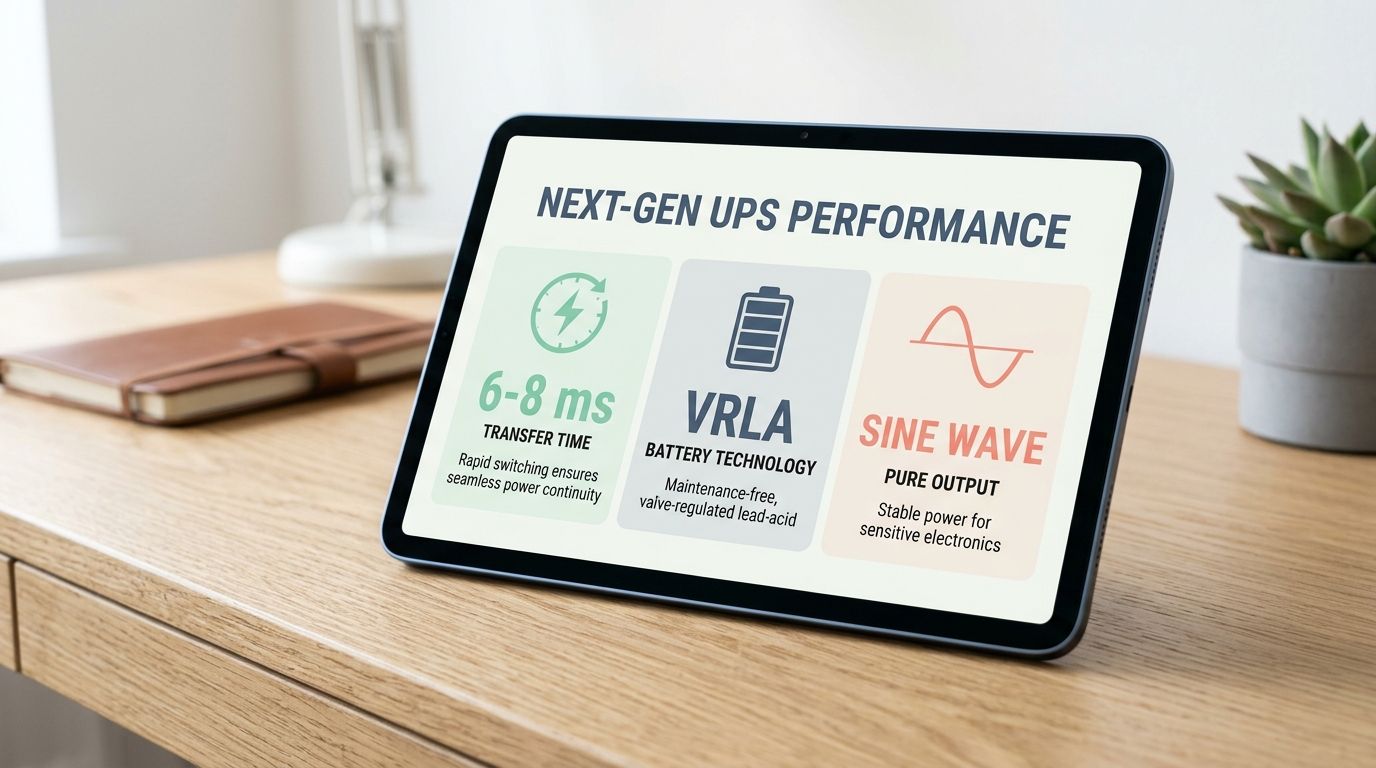
- وقت التحويلقائمة بالعديد من نماذج الاستعداد 6-8 مللي ثانية عادي.
- شكل الموجة عند استخدام البطارية: موجة جيبية محاكاة مقابل خرج موجة جيبية نقية.
- نافذة جهد الإدخال: يمكن أن تعني نافذة أوسع عمليات نقل أقل للبطارية أثناء انخفاضات الجهد الطفيفة.
- نوع البطاريةتستخدم معظم وحدات الطاقة الاحتياطية الصغيرة بطاريات الرصاص الحمضية المنظمة بالجهد (VRLA). لذا، خطط لاستبدالها بشكل دوري.
إذا كنت ترغب في مثال عملي على سلوك وضع الاستعداد، فإن شركة Vertiv تُدرج جهاز Liebert PST5 كخط إنتاج UPS مكتبي احتياطي، وتنشر بيانات خرج موجة جيبية مُحاكاة وزمن نقل نموذجي يتراوح بين 6 و8 مللي ثانية لهذه السلسلة. هذا النمط شائع في العديد من تصميمات أجهزة UPS الاحتياطية، حتى وإن اختلف شكل اللوحة الأمامية.
مصدر طاقة غير منقطع (UPS) من النوع التفاعلي
تعتبر تقنية UPS التفاعلية الخطية هي البنية التي تلجأ إليها العديد من الفرق لرفوف الفروع وخزائن الشبكة وغرف الخوادم الصغيرة لأنها توازن بين التكلفة وعمر البطارية والحماية.
يستمر الجهاز في تزويد الأحمال بالطاقة الكهربائية في الوضع الطبيعي، ولكنه مزود بدوائر تنظيم الجهد التلقائي (AVR) التي يمكنها رفع أو خفض الجهد دون الحاجة إلى البطارية. وهذا أمر بالغ الأهمية في الواقع العملي، لأن انخفاضات الجهد المفاجئة وفترات انخفاض الجهد الطويلة قد تستنزف البطاريات بسرعة إذا اضطر جهاز UPS إلى العمل على البطارية في كل مرة ينخفض فيها الجهد.
يُعد جهاز استقبال الصوت والفيديو (AVR) السبب الحقيقي لاختيار التفاعل الخطي
لا يُعدّ منظم الجهد التلقائي (AVR) مجرد ميزة تسويقية غامضة، بل هو أسلوب مُحدد يُعدّل الجهد الكهربائي بالزيادة (رفع الجهد) أو النقصان (خفض الجهد) للحفاظ على خرج الطاقة قريبًا من القيمة الاسمية دون استنزاف البطارية. وتصف شركة شنايدر إلكتريك هذا السلوك الخاص بالزيادة والخفض بأنه الوظيفة الأساسية لمنظم الجهد التلقائي في الأنظمة التفاعلية مع الخط.
- مناسب تمامًاالمناطق ذات التردد العالي تقلبات الجهد لكن مع انقطاعات طويلة أقل.
- تحسين وقت التشغيل: تقليل عمليات نقل البطارية يعني تقليل عدد إنذارات انخفاض البطارية التي يمكن تجنبها وتقليل حالات الإغلاق غير المتوقعة.
- انخفاض استهلاك البطارية: عادةً ما يعني انخفاض وقت تشغيل البطارية عمرًا أطول لها.
إعدادات وقت النقل والحساسية
لا يُعدّ التفاعل عبر الخطوط "نقلًا صفريًا للطاقة"، فهو لا يزال ينقل الطاقة إلى البطارية عند الحاجة. ما يتغير هو عدد مرات الحاجة إلى القيام بذلك.
كما أن وقت التحويل قد يختلف باختلاف إعدادات الحساسية. وتنشر شركة شنايدر إلكتريك نطاقات أوقات التحويل النموذجية لبعض عائلات الأجهزة التفاعلية مع الخطوط، بما في ذلك 2-4 مللي ثانية عند استخدام حساسية عالية، استخدم قيمًا أعلى عند استخدام حساسية منخفضة. هذا مفيد لأنه يمكنك ضبط الحساسية لتقليل عمليات النقل غير المرغوب فيها، ولكن يجب عليك التأكد من أن وقت النقل الناتج لا يزال مناسبًا لتفاوت الحمل.
مراجعة واقعية لعملية الانتشار في الولايات المتحدة: الطاقة والمقابس
في عمليات التركيب في أمريكا الشمالية، تصل العديد من مشاريع أنظمة الطاقة غير المنقطعة (UPS) إلى حد أقصى للمقابس قبل أن تصل إلى حد أقصى للتصميم الشبكي. تستخدم العديد من وحدات UPS التي تبلغ قدرتها 1500 فولت أمبير أو أقل قابسًا قياسيًا بقوة 15 أمبير، بينما تحتاج الوحدات الأكبر حجمًا والمثبتة على الرفوف غالبًا إلى دوائر كهربائية بقوة 20 أو 30 أمبير، بالإضافة إلى القابس والمقبس المناسبين.
إذا كنت تحمي رفوف الخوادم, خطط أيضًا لتوزيع الطاقة في المراحل اللاحقة. يمكن لوحدة توزيع الطاقة المثبتة في الرف، والتي تحتوي على مزيج مناسب من منافذ NEMA وIEC، أن تغنيك عن تركيب محولات الطاقة بشكل غير أنيق وغير آمن، وعن استبدال الأسلاك في اللحظة الأخيرة.
خدمة UPS عبر الإنترنت (التحويل المزدوج)
يقوم جهاز تحويل مزدوج عبر الإنترنت بتحويل التيار المتردد الداخل إلى تيار مستمر، ثم يعيده إلى تيار متردد عالي الجودة باستمرار. يقوم المقوم بتغذية ناقل التيار المستمر وشحن البطاريات، بينما يقوم العاكس بتزويد الحمل بالطاقة بشكل مستمر.
هذا التصميم هو السبب في قدرة خدمة UPS عبر الإنترنت على التوصيل وقت نقل صفر أثناء انقطاع التيار الكهربائي. يعمل الحمل بالفعل من العاكس، لذلك لا توجد عملية تحويل يجب القيام بها.
لماذا تظهر أنظمة UPS عبر الإنترنت في مراكز البيانات (ورفوف الذكاء الاصطناعي)؟
- مخرجات نظيفة: قوي تكييف الطاقة وجهد وتردد ثابتين.
- عزل: حماية أفضل من الشذوذات في التيار الكهربائي التي يمكن أن تتجاوز الحماية الأساسية من ارتفاع التيار.
- القدرة على التنبؤ: عدد أقل من عمليات إعادة الضبط "الغامضة" المرتبطة بتشوه شكل الموجة، أو الانخفاضات القصيرة، أو غرائب النقل.
بالنسبة للأحمال ذات الكثافة العالية مثل الذكاء الاصطناعي يمكن لأنظمة الخوادم المزودة بوحدات تزويد الطاقة غير المنقطعة (UPS) المتصلة بالإنترنت أن تقلل من حساسية النظام للتشويش الناتج عن التيار الكهربائي والتقلبات السريعة. وهذا أمر بالغ الأهمية لأن التغيرات السريعة في الأحمال والاستخدام العالي للطاقة قد تكشف عن نقاط ضعف في أنظمة الطاقة ذات القدرة المحدودة.
وضع ECO والكفاءة: مفيدان، ولكن استخدمهما عن قصد
تُوفر العديد من أنظمة UPS ذات التحويل المزدوج عبر الإنترنت وضع كفاءة (يُطلق عليه غالبًا وضع ECO) يُمكنه رفع الكفاءة في ظل ظروف الشبكة الجيدة من خلال استخدام مسار جانبي بشكل أكثر فعالية. ويشير معهد Uptime إلى أن الأنظمة الحديثة تصل عادةً إلى 94% إلى 96% الكفاءة في التشغيل العادي ويمكن أن تصل حوالي 98% في أوضاع الاقتصاد، ولكن هذه الأوضاع يمكن أن تزيد من المخاطر بالنسبة للأحمال التي تحتاج إلى تكييف أكثر دقة.
إذا كان تطبيقك يحتاج حقًا إلى "التواجد عبر الإنترنت طوال الوقت"، فتعامل مع وضع ECO كقرار للتحكم في التغيير، وليس كخانة اختيار افتراضية.
ميزات سهولة الصيانة التي تهم في العمليات الحقيقية
- بطاريات قابلة للاستبدال أثناء التشغيليقلل من الاضطراب أثناء استبدال البطارية.
- تجاوز الصيانة: يتيح لك صيانة جهاز UPS مع الحفاظ على تشغيل الأحمال من مسار آمن.
- المراقبة: استخدم برنامج إدارة UPS لتتبع الحمل ووقت التشغيل وحالة البطارية، ولتشغيل عمليات إيقاف التشغيل النظيفة.
في العديد من البيئات، تقوم الفرق بربط وحدات تزويد الطاقة غير المنقطعة (UPS) المتصلة بالإنترنت بالمولدات. تتولى وحدة UPS معالجة الثواني إلى الدقائق الأولى، ثم يتولى المولد معالجة الأحداث الأطول، وتقوم وحدة UPS بتنظيم الطاقة من خلال بدء تشغيل المولد وسلوك نقل الطاقة.
مقارنة بين أنظمة UPS الاحتياطية والتفاعلية عبر الخط والإنترنت [جدول]
راجع هذه المقارنة الموجزة لاختيار نوع UPS المناسب.
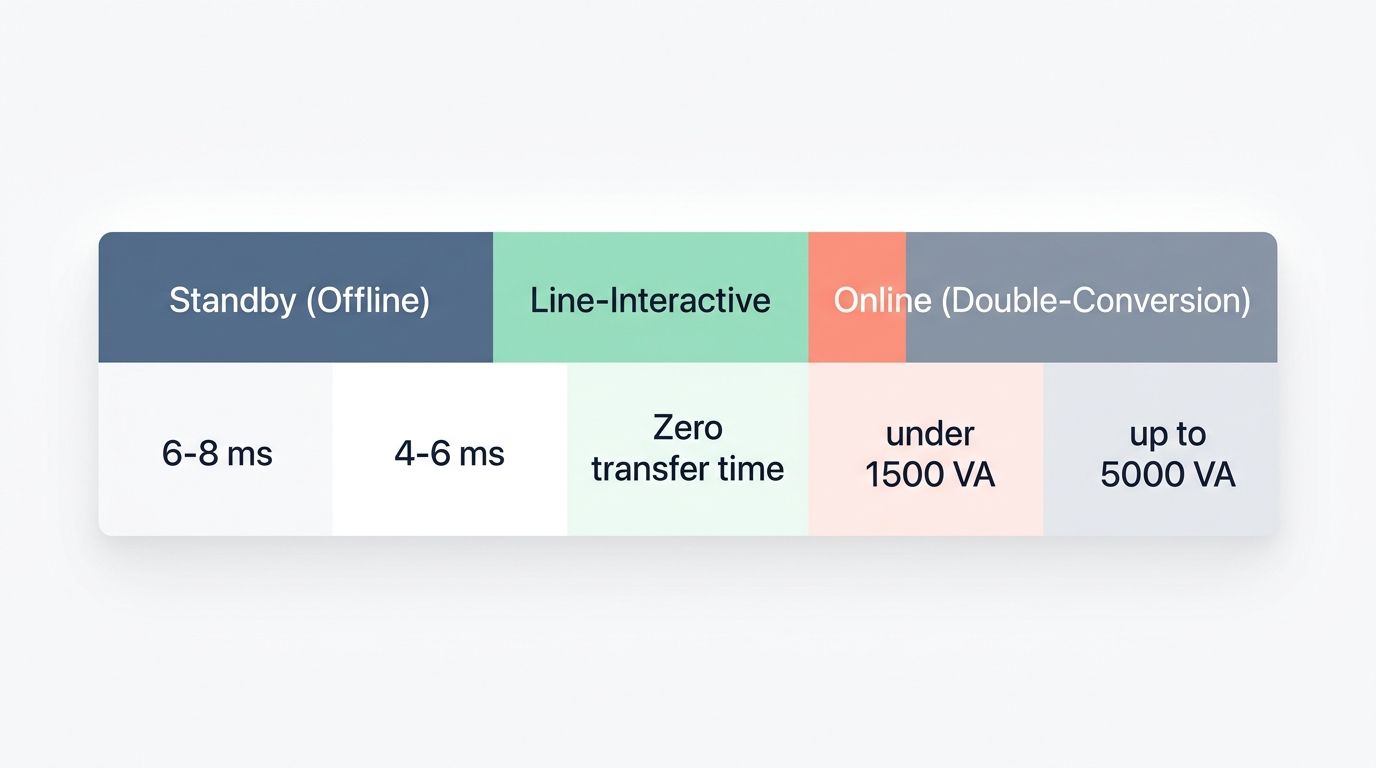
| ميزة | وضع الاستعداد (غير متصل بالإنترنت) | تفاعلي بالخط | عبر الإنترنت (تحويل مزدوج) |
|---|---|---|---|
| الوظيفة الأساسية | – يوفر حماية أساسية من ارتفاع التيار الكهربائي. – يحمي الأجهزة الإلكترونية الصغيرة وأجهزة الكمبيوتر المنزلية. | - ينظم الجهد باستخدام محول ذاتي (AVR boost/trimm). – يدعم الخوادم ومعدات الشبكة. | – يوفر تكييفًا مستمرًا للطاقة. - يحافظ على استمرارية عمل الأحمال الحيوية في جميع الأوقات. |
| السعة النموذجية | – الأفضل للأجهزة التي تقل قدرتها عن 1500 فولت أمبير (غالباً ما تكون محدودة بمقابس ودوائر 15 أمبير). – أجهزة سطح المكتب ومعدات المكاتب الصغيرة مناسبة تمامًا. | - شائع في تركيبات الرفوف حتى 5000 فولت أمبير، اعتمادًا على سعة الدائرة. – مناسب للخوادم المتوسطة الحجم ووحدات الاتصالات. | - موازين للمنشآت الكبيرة ومراكز البيانات. – يتعامل مع أحمال الجهد العالي والمصفوفات الاحتياطية. |
| وقت التحويل | – يتحول إلى وضع البطارية في غضون 6-8 مللي ثانية في العديد من التصاميم. – التحقق من مدى تحمل المعدات الحساسة ومصادر الطاقة ذات تصحيح معامل القدرة النشط. | – يتحول إلى وضع البطارية في غضون 4-6 مللي ثانية في العديد من التصميمات (يختلف ذلك حسب الحساسية). – أفضل للأجهزة ذات الحساسية المتوسطة. | – يُظهر وقت نقل صفري في التشغيل العادي عبر الإنترنت. – مثالي لتلبية احتياجات زمن الاستجابة المنخفض والتوافر العالي. |
| جودة الطاقة | – يوفر تصفية أساسية فقط. - قد لا يكون خرج الطاقة عبارة عن موجة جيبية نقية عند استخدام البطارية. | – يوفر تنظيم الجهد وبعض الترشيح. – توفر العديد من الطرازات خرج موجة جيبية نقية عند استخدام البطارية. | – يوفر تكييف الطاقة 100%. – يُخرج موجة جيبية نقية لجميع الأحمال. |
| التكاليف ونفقات التشغيل | – الخيار الأكثر فعالية من حيث التكلفة. – أسعار شراء أولية منخفضة. | – تكاليف شراء وتشغيل معتدلة. - يوازن بين الحماية والميزانية. | – حل متميز وعالي التوافر. – ارتفاع تكاليف رأس المال والصيانة. |
| أفضل حالة استخدام | – المكاتب المنزلية ومحطات العمل الفردية. – وحدات نقاط بيع صغيرة. | – خوادم مثبتة على رفوف وخزائن بيانات صغيرة. – غرف تكنولوجيا المعلومات في المكاتب الفرعية تصل إلى 5000 فولت أمبير. | – مراكز البيانات الكبيرة والبنية التحتية الحيوية. – بيئات لا تتطلب وقت نقل بيانات. |
| مستوى الحماية | – حماية أساسية من زيادة التيار الكهربائي وبطارية احتياطية. – تعتمد الجودة على مدى تحمل الجهد قبل استخدام البطارية. | – حماية متوسطة، مع تعزيز/قطع الجهد. – يقلل من استهلاك البطارية في حالات الاضطرابات الطفيفة. | – أعلى مستويات الحماية، وتصحيح مستمر لشكل الموجة. – يمنع وصول الشذوذات في المصدر إلى الحمل. |
| أمثلة على المكونات والأدوات | – تشمل النماذج الشائعة وحدات سطح المكتب المدمجة. – يستخدم خلايا الرصاص الحمضية المغلقة أو خلايا VRLA. | – يوجد في هياكل التثبيت على الرفوف المقترنة بوحدات توزيع الطاقة. – يعمل مع برامج إدارة UPS. | – يتكامل مع مجموعات UPS الكبيرة ووحدات توزيع الطاقة (PDUs). – يتوافق مع منصات المراقبة والبطاريات القابلة للاستبدال السريع. |
كيفية اختيار نوع جهاز UPS المناسب لتطبيقك
اختر جهاز UPS يتناسب مع حجم الحمل، والموقع، وأهمية النظام، والميزانية. ابدأ بدراسة ما يواجهه موقعك فعلياً: انقطاعات التيار، وانخفاضات الجهد، وانخفاض الجهد اليومي.
في سياق موثوقية الشبكة، أفادت إدارة معلومات الطاقة الأمريكية بأن أحداثًا كبرى وقعت في عام 2024 رفعت متوسط مدة انقطاع التيار الكهربائي إلى مستويات أعلى من المعدلات المسجلة في السنوات الأخيرة في العديد من المناطق. لا يمكنك التحكم في الشبكة، ولكن يمكنك تحديد كيفية استجابة أحمالك الكهربائية عند حدوث خلل فيها.
- قم بقياس الحمل بالواط والفولت أمبير. استخدم لوحات البيانات، أو تصنيفات وحدات تزويد الطاقة، أو وحدات توزيع الطاقة المزودة بعدادات، ثم حدد حجم وحدة الإمداد بالطاقة غير المنقطعة (UPS) وفقًا لملف الحمل الفعلي. بالنسبة لأنظمة الرفوف القابلة للتوسع وقاعات البيانات، يمكن للخيارات المعيارية مثل Vertiv Liebert APS (من 5 كيلو فولت أمبير إلى 20 كيلو فولت أمبير، تحويل مزدوج) أن تستوعب النمو دون الحاجة إلى استبدال الهيكل بالكامل.
- تحقق من قيود الدائرة الكهربائية والمقابس مبكراً. في الولايات المتحدة، غالبًا ما تتطلب وحدات فئة 1500 فولت أمبير مقبس حائط قياسي 15 أمبير، بينما قد تتطلب أنظمة UPS الأكبر حجمًا مقبسًا مخصصًا 20 أمبير أو 30 أمبير. كما توصي إرشادات تحديد الحجم من إيتون باختيار جهاز UPS بقدرة تقارب 20% هامش VA للتعامل مع خطأ القياس وتقلبات الحمل.
- إذا كانت انقطاعات التيار الكهربائي هي مشكلتك الرئيسية، فابدأ بالتفاعل عبر الخط.. تُقلل وحدات UPS التفاعلية مع خط الطاقة والمزودة بوحدة تنظيم الجهد التلقائي (AVR) من دورات شحن البطارية أثناء انخفاض الجهد، مما يُساعد على الحفاظ على وقت تشغيل ثابت عند انقطاع التيار الكهربائي. ومن الأمثلة العملية على ذلك سلسلة Vertiv Liebert PSI5، التي تُشير مواصفاتها المنشورة صراحةً إلى أنها تفاعلية مع خط الطاقة ومزودة بوحدة تنظيم الجهد التلقائي (AVR).
- إذا كانت مهمة ضمان استمرارية الخدمة هي هدفك، فاختر خدمات الدعم عبر الإنترنت.. بالنسبة للمفاتيح الأساسية، ووحدات التخزين، وخوادم المحاكاة الافتراضية، وأي تطبيق يتطلب استمرارية التشغيل، توفر لك وحدات UPS ذات التحويل المزدوج عبر الإنترنت أنقى مخرجات وأسرع نقل بيانات. هذا هو الوضع الافتراضي للعديد من غرف الخوادم. مراكز البيانات, وخاصة عندما تكون الطاقة المولدة جزءًا من الخطة.
- حدد جودة شكل الموجة مع مراعاة مصادر الطاقة لديك.. إذا كنت تستخدم أجهزة كمبيوتر أو خوادم حديثة مزودة بتقنية تصحيح معامل القدرة النشط (PFC)، فاختر وحدة توفر خرج موجة جيبية نقية عند تشغيلها بالبطارية. تُعد هذه إحدى أكثر مشكلات التوافق شيوعًا لتصاميم وحدات UPS الاحتياطية لأجهزة الكمبيوتر المكتبية التي توفر خرج موجة محاكاة.
- خطط لوقت التشغيل بما يتناسب مع الإجراء, ليس مجرد تخمين. اختر هدفًا مثل "10 دقائق للقيادة خلال الأحداث القصيرة"، أو "15 دقيقة للتحويل التلقائي"، أو "وقت كافٍ للإيقاف الآمن". ثم تحقق من وقت التشغيل عند حمل الواط الفعلي، لأن تصنيف الفولت أمبير ليس طاقة مخزنة.
- اختر استراتيجية بطارية يمكنك صيانتها. تُعد بطاريات الرصاص الحمضية المنظمة بصمام (VRLA) شائعة الاستخدام واقتصادية، لكنها حساسة للحرارة. وتشير إرشادات شركة شنايدر إلكتريك (APC) عادةً إلى عمر بطاريات الرصاص الحمضية المنظمة بصمام (VRLA) في من 3 إلى 5 سنوات يُشير النطاق، ويُلاحظ أن ارتفاع درجة الحرارة قد يُقلل من عمر البطارية بشكل كبير. إذا كان الوصول إلى البطارية صعبًا، أو إذا كان جهاز UPS موجودًا في أماكن دافئة، فإن خيارات بطاريات الليثيوم أيون غالبًا ما تُبرر نفسها من خلال عمر خدمة أطول (يُشار إليها عادةً في من 8 إلى 10 سنوات في ظل الظروف المثلى) وعدد أقل من عمليات الاستبدال.
ورقة عمل سريعة لتحديد المقاسات (بسيطة، لكنها تمنع عمليات الشراء الخاطئة)
| خطوة | ماذا تفعل | ما تكتبه |
|---|---|---|
| 1 | أضف الحمل الفعلي بالواط | إجمالي الواط (واط) |
| 2 | تأكد من تصنيف الواط وتصنيف الفولت أمبير لوحدة الإمداد بالطاقة غير المنقطعة (UPS) | واط (W) وفولت أمبير (VA) لأنظمة UPS |
| 3 | حوّل الواط إلى فولت أمبير إذا كنت بحاجة إلى التحقق. | VA = واط / معامل القدرة (PF) |
| 4 | أضف مساحة كافية للنمو والزوار العابرين | السعة المستهدفة = المساحة الظاهرية المحسوبة × 1.2 |
| 5 | اختر مدة التشغيل بناءً على خطة الاستجابة لانقطاع الخدمة الخاصة بك | الدقائق المطلوبة عند حمل الواط الفعلي الخاص بك |
الخلاصة
اختر تصميم شبكة UPS الذي يتناسب مع مستوى المخاطر لديك، وليس التصميم الذي يبدو "أكثر ملاءمة للمؤسسات".“
بالنسبة لأجهزة الكمبيوتر المكتبية ذات الطاقة المنخفضة،, أجهزة احتياطية (وحدات UPS غير المتصلة بالإنترنت) تُقلل التكاليف وتوفر حماية أساسية من ارتفاع التيار الكهربائي وطاقة احتياطية. بالنسبة للخزائن والرفوف التي تكثر فيها انقطاعات التيار الكهربائي الجزئية،, تفاعلي عبر الخط يضيف نظام تنظيم الجهد حتى لا تستهلك البطاريات بالكامل مع كل انخفاض في الجهد.
ل مراكز البيانات والأحمال الحرجة الأخرى، مزود الطاقة غير المنقطع (UPS) يوفر نظام التحويل المزدوج عبر الإنترنت أفضل جودة للطاقة دون أي وقت تحويل. أضف إلى ذلك المراقبة والتشغيل الآلي الواضح لإيقاف التشغيل، وستصبح انقطاعات التيار الكهربائي القادمة حدثًا مُتحكمًا فيه بدلًا من حالة من الفوضى.
الأسئلة الشائعة
1. ما الفرق بين أنظمة UPS الاحتياطية، والتفاعلية مع الخط، والإنترنت (التحويل المزدوج)؟
يتحول وضع الاستعداد إلى بطارية احتياطية عند انقطاع التيار الكهربائي الرئيسي، وهو بسيط ويلبي الاحتياجات الأساسية؛ ويضيف وضع التفاعل مع الخط تنظيم الجهد للتعامل مع انخفاضات وارتفاعات الجهد، ويقوم نظام UPS عبر الإنترنت (التحويل المزدوج) بتحويل الطاقة باستمرار لتقديم أفضل جودة للطاقة ووقت تحويل صفري.
2. ما هو جهاز UPS المناسب لمكتب صغير أو معدات حاسوب منزلية؟
يُناسب نظام Line-Interactive معظم المنازل والمكاتب الصغيرة، فهو يُوازن بين التكلفة وتنظيم الجهد مع توفير طاقة احتياطية موثوقة من البطارية. استخدم وضع الاستعداد للأحمال منخفضة التكلفة وغير الحرجة حيث تكون الانقطاعات القصيرة مقبولة.
3. أي نوع من أجهزة UPS يجب أن أختار للأنظمة والبنية التحتية الحيوية؟
نظام UPS المتصل بالإنترنت (ذو التحويل المزدوج) مناسب للأنظمة الحيوية التي تتطلب جودة طاقة عالية وانقطاعات مستمرة. فهو يعزل الأجهزة عن أعطال التيار الكهربائي الرئيسي ويوفر حماية قوية للأجهزة الإلكترونية الحساسة. اختر حجم الوحدة المناسب لحملك، وأضف خاصية المراقبة، وجدول صيانة البطارية.
4. هل أحتاج دائمًا إلى جهاز UPS متصل بالإنترنت (ذو تحويل مزدوج) للحماية من العواصف؟
ليس دائمًا، فوحدة Line-Interactive الجيدة أو وحدة Standby عالية الجودة غالبًا ما تتعامل مع العواصف وانقطاعات التيار القصيرة وتوفر التكاليف، ولكن اختر Online (Double-Conversion) للتطبيقات التي تتطلب تشغيلًا دائمًا وتتطلب مهمة بالغة الأهمية.