
Ever had your computer shut down right in the middle of saving an important file?
You’re not alone. Power outages hit the Philippines frequently, and according to data from the Center for Energy, Ecology, and Development, forced outages significantly outnumbered planned maintenance from 2019 to 2025.
The good news? A solid uninterruptible power supply can keep your work safe and your internet connection alive during those frustrating brownouts.
In this guide for the Best Uninterruptible Power Supply Philippines, I’ll walk you through the top picks and show you exactly what to look for. Let’s make sure your next power cut doesn’t ruin your day.
Key Takeaways
-
- Match your UPS voltage and current to your devices. A Globe router typically needs 12V at 1A, while many non-telco routers pull 12V at 2A.
-
- Higher battery capacity means longer backup. The Panther DC UPS PUD-362’s 10,400 mAh can power a 12V 1A router for up to 13 hours.
-
- Line-interactive models like the APC EASY UPS BVX 1200VA and CyberPower CP1350PFCLCD 1350VA offer automatic voltage regulation and cost 30-40% less than online UPS systems.
-
- Plan for battery replacement every 2-3 years. According to Schneider Electric Philippines, UPS batteries between 3-5 years old should be replaced for best performance.
-
- The Philippines UPS market is growing at 5.4% annually through 2033, driven by frequent power disruptions and rising demand for reliable backup power.
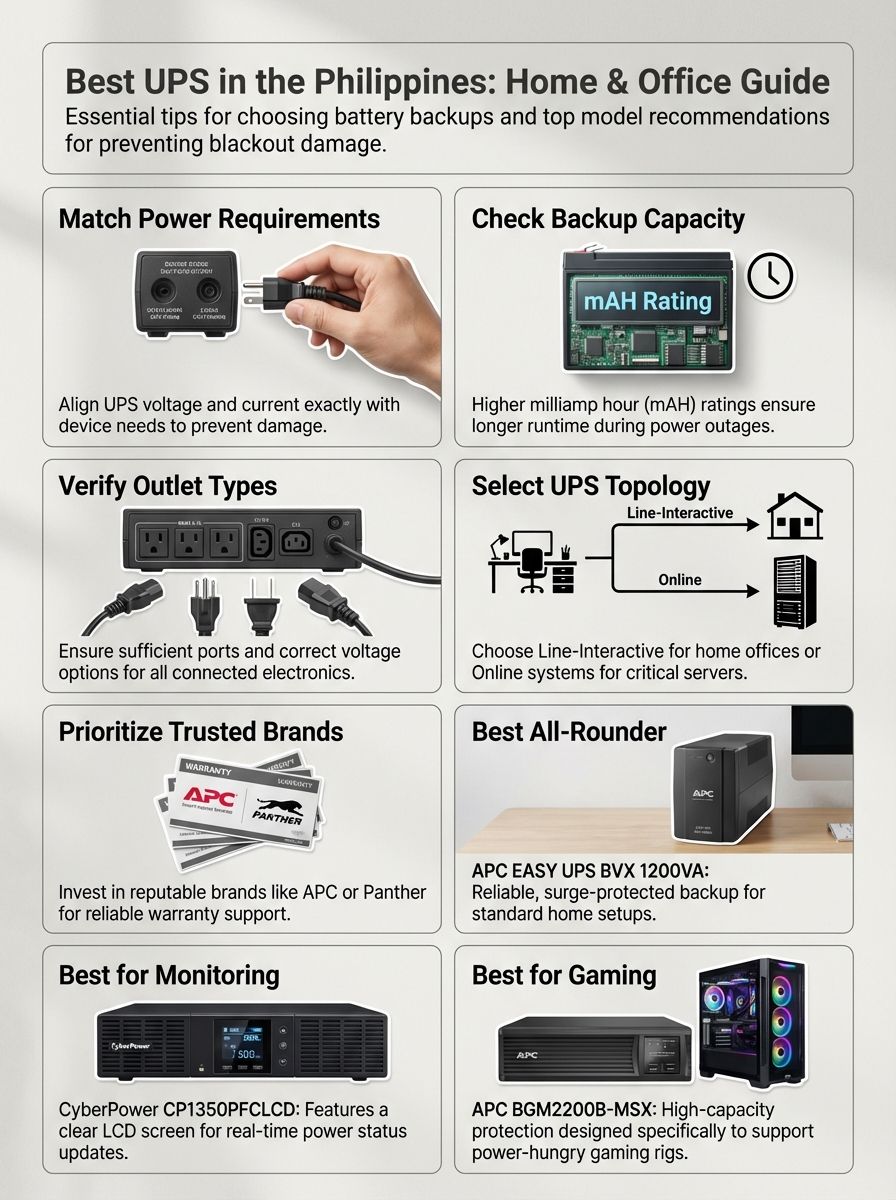
How to Choose the Best UPS for Home and Office
Picking the right UPS can feel overwhelming with so many options out there.
But here’s the thing. Focus on these core factors, and you’ll find the perfect match for your setup.
Power requirements
Your devices need specific voltage and current to run safely.
Mismatch these, and you risk frying your router or modem. Most Globe WiFi routers run on 12V at 1A. Many non-telco routers, though, need 12V at 2A. That’s double the current draw.
Check both the device label and adapter before connecting anything. AC uninterruptible power supplies for Philippine homes typically deliver 220V or 240V AC. This voltage works perfectly for desktops, point-of-sale systems, and emergency lighting.
DC UPS units cover lower voltages. You’ll find options for 5V, 9V, 12V, and up to 24V. According to Panther Philippines, matching the voltage port exactly prevents blown fuses and damaged equipment.
Output port ratings matter just as much as voltage. Plug into a port with weak current, and you’ll damage security cameras or servers. Pick a model covering all your workstation needs to keep backup power reliable during sudden outages, especially if network infrastructure runs all day in server rooms.
Backup time
Battery backup time determines how long your devices stay powered during an outage.
This metric is measured in milliamp hours (mAH). Higher mAH means longer runtime. The Panther DC UPS PUD-362 packs 10,400 mAH. It can power a 12V 1A router for almost 13 hours straight.
Industry research from 2025 shows that office workstations typically need 10 to 20 minutes of backup time. That’s enough to save work and shut down safely. Servers and data centers require 1 to 2 hours for handover to generator systems.
Two big factors affect actual performance:
-
- Number of devices plugged into power sockets
-
- Each device’s power load
More gadgets drain battery juice faster than one modem running alone. High-capacity models offer longer uninterrupted use but come with steeper price tags.
Batteries degrade over time. Constant charging gradually wears them down. Lithium batteries used in modern DC UPS systems typically last up to 2 years, though this varies based on usage patterns and ambient temperature.
Before checking out that new UPS, match backup time to your usual outage length. That way, neither your network nor critical systems leave you guessing during an emergency.
Number and type of outlets
The right outlet mix makes life easier as your tech setup grows.
The Panther DC UPS PUD-362 offers serious versatility. It packs USB DC 5V/2A for phones or tablets. You get dedicated outlets for biometric machines, CCTV cameras, and routers. Voltage options run from 5V up to 24V.
POE support at both 15V and 24V lets you power network gear without messy adapters.
Multiple voltages mean better fit now and flexibility for new tech later. Skip a UPS with too few outputs, and chaos reigns when you need to add another device. Select a backup power supply matching today’s needs while staying ready for changes down the road.
According to Eaton’s specifications, their 5A series offers 4 to 6 outlets depending on the model. The APC EASY UPS BVX 1200VA includes multiple AC outlets for connecting computers, routers, and TVs without hassle.
UPS type (Online, Standby, Line-Interactive)
The three main UPS types offer different levels of protection.
Let’s break down what each one does and when to use them.
| UPS Type | Transfer Time | Best For | Key Feature |
|---|---|---|---|
| Standby | ~10 milliseconds | Basic devices like routers, monitors | Kicks in only during outages |
| Line-Interactive | 4-6 milliseconds | Small offices, home setups | Automatic voltage regulation built-in |
| Online | Zero | Hospitals, critical servers | AC-DC-AC conversion runs constantly |
Online UPS units run power through batteries at all times. They offer the best protection for sensitive devices like hospital equipment and critical servers. These systems cost more because they use AC-DC-AC conversion, which loses some energy in the process.
Line-interactive UPS types add automatic voltage regulation to cut down on battery wear. They handle minor sags or surges without switching to battery power. According to research from Vertiv, line-interactive models cost up to 40% less than online UPS systems. They’re ideal for small offices or home setups where stable voltage makes a big difference.
Standby UPS models switch on only during outages or big voltage drops. They work well for basic gear such as routers or simple tower PCs but may have short switchover delays.
Dedicated DC UPS options provide extra efficiency if you need battery backup for gadgets wanting straight DC power. These work great for access control panels or telecommunications systems.
Picking the wrong type wastes energy and risks compatibility problems with your electronics. For gear needing high reliability, especially with patient safety in mind, always match your uninterruptible power supply system to both device requirements and budget limits.
Budget and brand reliability
Not all uninterruptible power supplies charge the same price.
DC UPS units often cost less than AC models. This makes them a smart pick for homes or small offices on a tight budget. According to data from Philippine retailers in 2025, the APC EASY UPS BVX 1200VA sells for around ₱7,997 to ₱8,997. The Eaton 5A Advantage Series starts from ₱2,199.
Brands like Panther and APC have earned trust in the Philippines for reliable battery backup and good service support.
Always check if your unit’s battery can be replaced. Lithium batteries typically last up to 2 years depending on usage. Choosing a reputable brand saves money long-term with better warranties and after-sales help.
High efficiency in UPS systems can also cut energy costs down the road. APC and Panther both offer solid options. Look at features, not just logos. Some tower UPS models let you change batteries instead of buying new devices every couple of years.
The IMARC Group projects that the Philippines UPS system market will grow from $94.30 million in 2024 to $175.80 million by 2033. This growth is driven by frequent power disruptions and rising digitalization. Having reliable choices protects both your wallet and peace of mind during power interruptions.
APC EASY UPS BVX 1200VA
The APC EASY UPS BVX 1200VA delivers 650 watts of real power for your home or small office.
This line-interactive UPS packs automatic voltage regulation and surge protection in one neat package.
Features & Description (APC EASY UPS BVX 1200VA)
This line-interactive UPS delivers steady AC power at 220V to 240V. It keeps your devices running during brownouts and blackouts.
The tower design fits neatly under desks or beside workstations. You can connect computers, routers, or even TVs without hassle. Multiple AC outlets give you flexibility for different devices.
Built-in surge protection guards sensitive gadgets from voltage spikes. According to APC by Schneider Electric Philippines, this model features Boost Automatic Voltage Regulation (AVR). The AVR preserves battery life and maximizes runtime by correcting low voltages without discharging the battery.
This battery backup offers efficient energy use through automatic voltage regulation. It reduces interruptions for standard AC-powered devices. During short to moderate outages, it gives enough time for safe shutdowns or uninterrupted workflow.
Hospitals and businesses needing high availability trust its stable performance. The unit delivers a trusted power rating of 1200 volt-amperes (VA). LED indicator lights keep you informed about status at a glance.
The cold-start capability provides temporary battery power even when utility power is out. This feature proves handy during extended outages in the Philippines.
Pros & Cons (APC EASY UPS BVX 1200VA)
Plenty of buyers in the Philippines consider this a top pick.
But even the best uninterruptible power supply has strengths and trade-offs. Here’s what you really get with this power backup, laid bare.
| Pros | Cons |
|---|---|
|
|
CyberPower CP1350PFCLCD 1350VA
The CyberPower CP1350PFCLCD brings battery backup to your gadgets with a clear LCD screen.
You know what’s happening fast, so you can stay connected without missing a beat.
Features & Description (CyberPower CP1350PFCLCD 1350VA)
This line-interactive UPS delivers 1350VA of battery backup.
It’s perfect for computers and network equipment during brownouts or power interruptions. The unit supplies steady AC power at local Philippine standards, from 220V to 240V AC.
The front features a bright LCD displaying important live data. You see load levels, input voltage, and remaining battery life at a glance. According to PC Express Philippines, the screen tilts for easy viewing when the UPS sits in a low position such as under a desk.
Surge protection keeps your devices safe from sudden spikes. The tower UPS features a smart battery management system extending battery lifespan. Several outlets let you connect multiple office electronics like routers or printers with ease.
Hot-swappable batteries mean you can replace them without shutting things down. That’s a real lifesaver in busy workplaces. The CyberPower CP1350PFCLCD uses Automatic Voltage Regulation (AVR) to correct minor power fluctuations without switching to battery power.
Energy efficiency cuts down on energy use while keeping performance high. For anyone needing reliable uninterrupted power supply and clear status updates, this unit checks plenty of boxes for both home users and small businesses alike.
It delivers pure sine wave output, making it compatible with Active Power Factor Correction (PFC) power supplies. This matters for high-end computer systems and servers.
Pros & Cons (CyberPower CP1350PFCLCD 1350VA)
This model is often picked by buyers wanting strong UPS features for both home and office setups.
Here’s a straightforward look at its strengths and weak points.
| Pros | Cons |
|---|---|
|
|
Eaton 5A1200I-NEMA 1200VA
If you want a line-interactive UPS with good battery backup, the Eaton 5A1200I-NEMA 1200VA stands tall among tower UPS choices.
This model keeps your devices running during interruptions.
Features & Description (Eaton 5A1200I-NEMA 1200VA)
The Eaton 5A1200I-NEMA gives strong AC backup at 220V to 240V.
It’s perfect for the Philippines’ power needs. This model works well in office spaces as a tower UPS built to shield computers, routers, and other commercial devices from sudden outages or voltage spikes.
According to Eaton Philippines, prices for the 5A Advantage Series start from ₱2,199. This model includes surge suppression and noise filtering. Your gear stays safe from electrical shocks and annoying hums.
Plug multiple gadgets into its several AC outlets. No more fighting over sockets during brownouts. The NEMA model offers 6 NEMA universal outlets for easy connection.
An internal battery powers your setup when you lose electricity. It keeps things running for short stretches so files stay safe and calls don’t drop mid-sentence. Expect the built-in battery to last up to 2 to 3 years before needing a swap.
Status LEDs or alarms keep you posted on system health and low-battery warnings without guesswork. Eaton’s line-interactive tech helps smooth minor power dips before they become big interruptions.
The input voltage range of 140 to 300 VAC makes this unit suitable for areas with unstable power supply. This battery backup device delivers reliable performance for both home offices and business setups wanting steady performance.
Pros & Cons (Eaton 5A1200I-NEMA 1200VA)
The Eaton 5A1200I-NEMA can power your workstation or home office, rain or shine.
Here’s a quick run-through of its strengths and rough edges.
| Pros | Cons |
|---|---|
|
|
Secure UPS-1500VA PRO
Got sensitive gadgets that can’t afford downtime?
The Secure UPS-1500VA PRO brings reliable battery backup, perfect for any office with lots of devices and USB ports waiting to be powered during brownouts.
Features & Description (Secure UPS-1500VA PRO)
The Secure UPS-1500VA PRO handles bigger jobs than smaller models.
It powers computers, servers, or even several office electronics up to 1500VA. You get steady AC output at Philippine standards of 220V to 240V.
Multiple AC output ports let you plug in more devices at once. This makes it perfect for clustered setups like workstations or small server racks. This line-interactive UPS offers protection from sudden surges and voltage dips that can fry your gear.
Visual status lights keep you posted on battery levels and system health. No guesswork here. Smart alarms will sound if there is trouble, like power interruptions or electrical spikes. You have time for quick action if needed.
The built-in battery lasts up to two years before needing a swap. Treat it right with regular checks and cleaning for the best backup results. Handy USB port support makes connecting peripherals a breeze.
This unit keeps everything safe during outages or late-night work sessions. The higher 1500VA capacity means you can connect more equipment compared to 1200VA models, making it suitable for growing home offices or small businesses.
Pros & Cons (Secure UPS-1500VA PRO)
High capacity means you can hook up several devices to this uninterruptible power supply.
Surge and voltage protection keeps computers, networking gear, and even your gaming rig safer from nasty brownouts. Its multiple outlets make it a solid pick for both home offices and bustling small businesses that want true battery backup.
It comes with some trade-offs. The price sits higher than many line-interactive UPS units, especially if you only need it for one or two gadgets.
DC-only loads lose out too, since energy gets wasted in the AC-DC-AC conversion process. Battery swaps pop up every couple of years, so add that to your list of upkeep tasks.
Plus, this tower UPS is bulkier compared to slim DC models. Not ideal if space is super tight or wall-mounting is important to you.
APC BGM2200B-MSX 2200VA Gaming UPS
Gamers know the pain of power loss mid-game, right?
The APC BGM2200B-MSX 2200VA Gaming UPS steps up with serious battery backup and line-interactive tech for your gaming setup or parallel processing rig.
Features & Description (APC BGM2200B-MSX 2200VA Gaming UPS)
The APC BGM2200B-MSX 2200VA Gaming UPS supplies strong battery backup for gaming equipment needing 220V to 240V AC power.
With its high VA rating, you can plug in a powerful PC, a gaming tower, your console, and even some extra peripherals at the same time.
This line-interactive UPS uses surge and voltage protection to guard expensive gear from sudden spikes or brownouts. LED status indicators keep you in the loop if trouble pops up. Alarms chime when it’s working hard or needs attention.
Multiple outlets make parallel processing setups possible for streamers or anyone juggling two screens during marathon sessions. Built with fast response times for minimal lag during outages, it helps keep matches alive while other homes go dark around you.
Designed to meet Philippine voltage standards right out of the box, this model does require occasional battery swap-outs. Maintenance is quick and simple so you’re back in action fast.
The 2200VA capacity delivers significantly more power than standard home UPS units. This makes it suitable for high-performance gaming PCs with multiple graphics cards or content creation workstations.
Pros & Cons (APC BGM2200B-MSX 2200VA Gaming UPS)
High power capacity meets the demands of gaming towers and line-interactive UPS setups.
Surge and voltage protection keeps expensive electronics safe during brownouts, spikes, or sudden interruptions. More AC outlets mean you can plug in a full gaming battlestation without juggling cords. This battery backup is built for heavy loads.
Price runs higher than basic models due to its 2200VA rating and advanced features. It uses AC-DC-AC conversion which decreases energy efficiency compared to simple units.
You may need a battery replacement as often as every two years. Set a reminder unless you enjoy surprise shutdowns mid-game. Its size takes up serious space, so think about where you’ll park it before buying.
Not ideal if all you run is lamps or low-load gadgets. That’s like using a fire hose just to water one plant.
Frequently Asked Questions About UPS Devices
Have questions about battery backup or line-interactive UPS setups?
This section sheds light on common worries with straight answers.
What is the ideal backup time for a UPS?
Most homes and small offices benefit from a UPS with at least 15 to 30 minutes of backup time.
This window helps you save work, shut down your PC, or keep the internet running during brownouts. According to industry guidelines published in 2025, office workstations typically need 10 to 20 minutes of backup. That’s enough to save work and shut down safely.
In some cases, like router-only setups with models such as the Panther DC UPS PUD-362, users get up to 13 hours for a single 12V device pulling just 1 amp.
Servers and data centers require 1 to 2 hours to allow for safe handover to generator systems. Backup length always depends on battery capacity and how much juice your devices need.
A larger battery inside the tower UPS keeps things online longer but raises both size and cost. Power-hungry gadgets eat up charge faster than routers or printers in standby mode.
Frequent blackouts or remote work demands might push you to pick line-interactive UPS units with bigger batteries for extended relief. Battery performance drops over time. Plug in only what’s needed if you want those extra precious minutes when it counts most.
Always choose an uninterruptible power supply that covers your usual outage time plus a little buffer.
How do I maintain my UPS for long-term use?
Check your uninterruptible power supply every 3 to 6 months for wear or signs of damage.
According to Schneider Electric Philippines, UPS batteries between 3 to 5 years old should be replaced. Lithium batteries give you better efficiency, faster charging, and may last up to 2 years based on usage.
Avoid overloading. Plug in only what the battery backup can handle during a blackout. See if your UPS battery is replaceable, so you don’t have to swap out the whole tower UPS after just two years.
Follow manufacturer instructions for battery replacement. This keeps things running smooth and safe. Keep your line-interactive UPS at room temperature between 68°F and 77°F. Heat shortens lifespan fast.
Dust off vents now and then to avoid overheating issues that sneak up quietly with Philippine humidity. Visual inspections can reveal early signs of wear such as leakage or corrosion.
Use troubleshooting guides like those from Panther DC UPS (PUD-362) if something acts odd or doesn’t charge right. Sticking to these simple tips helps stretch every peso, keeping brands like APC EASY working longer for home or office use.
Conclusion
Power glitches can hit any home or office in the Philippines.
A good uninterruptible power supply stops that from happening. From battery backup to line-interactive UPS, you now know what fits both your budget and devices.
Pick smart and stay connected without missing a beat or losing progress again, especially during those big Zoom calls. Your gadgets will thank you for it.
FAQs
1. What is an uninterruptible power supply and why do I need one?
A UPS acts as a reliable battery backup that keeps your computer running during the sudden power interruptions we frequently experience in the Philippines. It buys you those crucial few minutes to save your files and properly shut down your system so you don’t lose any hard work.
2. What’s the difference between a line-interactive UPS and other types?
A line-interactive UPS is the best choice for our region because it uses Automatic Voltage Regulation (AVR) to stabilize the 220V current when it fluctuates. This technology corrects minor power dips and spikes without draining your battery, which significantly extends the life of your unit.
3. Is a tower UPS better for office use?
Yes, a tower UPS is often preferred because it stands vertically on the floor to save desk space and typically houses a larger battery capacity for extended runtime.
4. Should I consider the ASUS TUF series for gaming setups?
While the ASUS TUF series produces high-quality internal power supplies, they do not actually manufacture external UPS battery backups. To fully protect your ASUS TUF gaming rig, you should instead pair it with a pure sine wave UPS from a trusted brand like APC or CyberPower to ensure compatibility.
