
If you want your work to keep moving during a power outage, you need a backup plan that reacts instantly.
An uninterruptible power supply (also called an uninterruptible power supply (UPS)) is a battery-backed power supply that uses rectifiers, inverters, and smart switching to keep delivering clean AC power when the mains fail.
This guide breaks down how UPS systems work, which topology fits your risk (standby, line-interactive ups, or online double-conversion), and what to look for so you can protect servers, routers, and sensitive electrical equipment with confidence.
Key Takeaways
- A UPS provides instant battery backup and surge protection, covering everything from small desk units (around 200 VA) to data center scale (thousands of kVA). Typical runtime is sized for safe shutdown and short ride-through, often around 5–15 minutes.
- The three most common UPS topologies are standby (VFD), line-interactive (VI), and online double-conversion (VFI). Online systems provide zero transfer time because the inverter continuously supplies the load.
- Core UPS standards in the IEC 62040 series cover safety, EMC, and performance testing. In India, the IS 16242 series aligns many UPS requirements with IEC 62040.
- Battery life depends on chemistry and temperature: VRLA often runs 3–10 years, lithium-ion often runs 8–15 years, flooded lead-acid can exceed 25 years, and nickel-cadmium often runs 15–20 years. Heat is the silent killer, so plan ventilation and monitoring from day one.
- Modern UPS designs commonly target high power factor (often 0.9–1.0). Many current online systems also publish low input current distortion and high efficiency, with some eco modes reaching about 99% efficiency (model dependent).
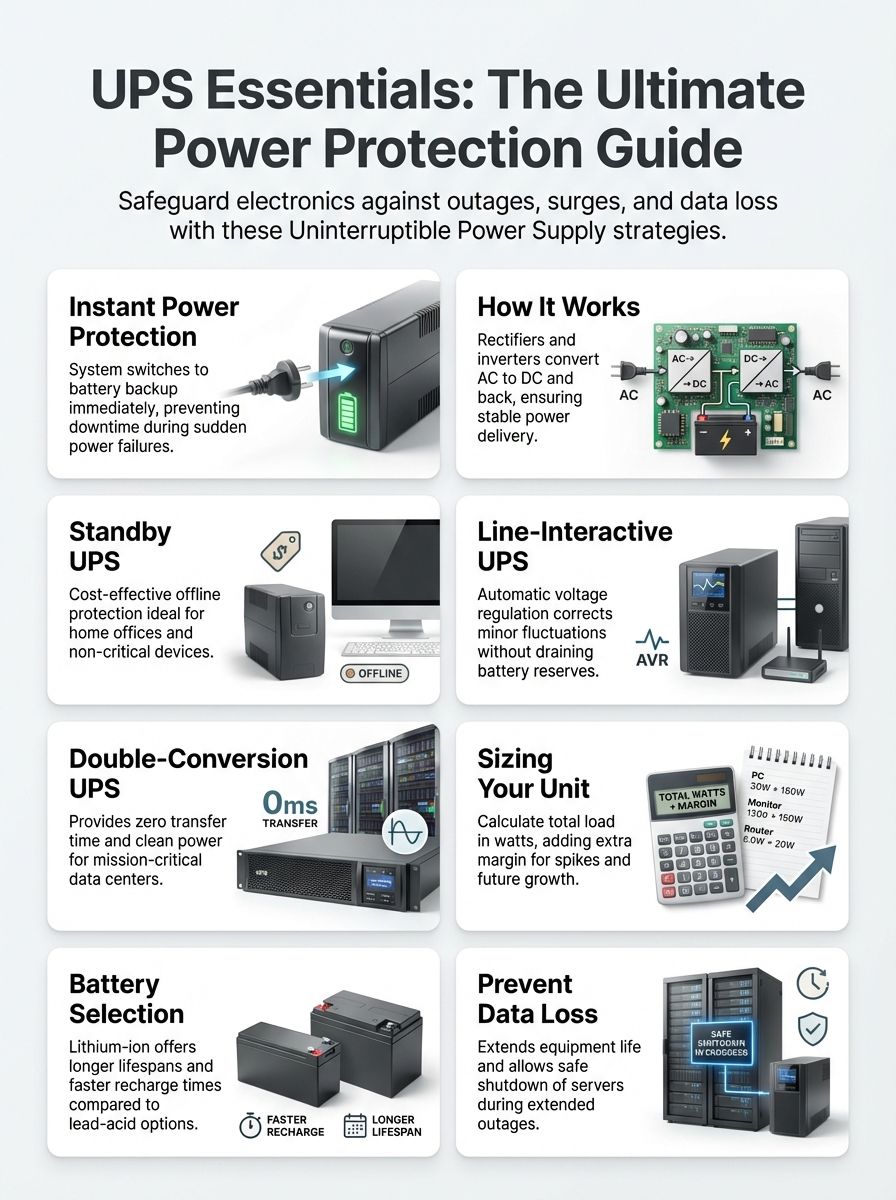
Exploring Uninterruptible Power Supply (UPS)
An uninterruptible power supply gives you backup power in milliseconds so your devices do not reboot, corrupt data, or suffer power quality stress during a power failure.
A UPS keeps equipment running and power clean during electrical trouble.
Unlike backup generators, which need time to start and stabilize, UPS systems switch to battery power immediately. That instant response is what protects computers, network gear, medical devices, and industrial control electronics from a hard stop.
In India, UPS selection also needs to match the reality of local power conditions. IEC 60038 lists 230/400 V (50 Hz) as the standard low-voltage system, which aligns with what most Indian homes and offices receive, so you should confirm your site voltage, frequency, and earthing before you size a unit.
For business procurement, the compliance side matters too. As of late 2025 updates from the Bureau of Indian Standards, IS 16242 (Part 1):2025 (aligned with IEC 62040-1:2017) has an implementation timeline that extends to November 19, 2026, so imported and locally sold UPS units may need BIS certification depending on your product category.
A UPS helps protect against:
- Power outages and short interruptions
- Voltage sags (brownouts) and sustained undervoltage
- Voltage spikes and surge events (surge protection)
- Noise and harmonics that reduce power quality and stress power supplies
Mechanism of a UPS System
A UPS converts and controls energy so your load always sees stable output, even when the input is unstable or gone.
In a typical online or line-interactive design, the rectifiers and charger convert incoming alternating current (ac) to direct current (dc) to charge the batteries and feed the DC bus. The dc-ac inverter then produces regulated AC output for your equipment.
Inside the cabinet, three subsystems do most of the work:
- Energy storage: a rechargeable battery string (VRLA, lithium-ion, flooded lead-acid, or nickel-cadmium)
- Power conversion: rectified DC and inverter output that stays within voltage and frequency limits
- Switching paths: transfer switch and bypass paths to keep loads powered during faults or maintenance
Transfer behavior is one of the biggest real-world differences between topologies. IEC 62040-3 defines transfer time as a performance metric and provides test methods for verifying it, so comparing vendor test reports can be more meaningful than comparing marketing labels.
For higher availability designs, sites often add a static bypass (for overloads or internal UPS faults) and a maintenance bypass (so technicians can service equipment without shutting down the critical load). In dual-feed racks, a static transfer switch can shift between two sources extremely fast, with some data center-ready models listing transfer times under 4 ms.
At large scale, you may also see rotary UPS or flywheel systems. A DRUPS setup can provide ride-through in the tens of seconds while the diesel engine takes over, which reduces dependence on large battery banks for short bridging events.
Diverse UPS System Configurations
To choose the right UPS topology, focus on how it behaves during poor mains power and how clean its output stays during switching and load steps.
IEC 62040-3 performance classifications group static UPS behavior into three common categories: VFD (voltage and frequency dependent), VI (voltage independent), and VFI (voltage and frequency independent). A 2024 U.S. Federal Register rulemaking summary also restates these IEC-based definitions clearly, which makes it a useful cross-check when vendor terms get confusing.
| UPS type | IEC-style class | What it does well | Typical fit |
|---|---|---|---|
| Standby UPS (offline UPS) | VFD | Basic surge protection and battery backup with a brief transfer | Single PC, router, small office loads |
| Line-interactive UPS | VI | Voltage regulation using taps/autotransformers without draining the battery | Home offices, SMB racks, edge closets with frequent undervoltage |
| Online/double-conversion UPS | VFI | Continuous power conditioning with zero transfer time | Data centers, healthcare, finance, critical process control |
Standby UPS Explained
A standby UPS is the simplest way to get battery backup and basic surge protection, and it is usually the lowest-cost topology.
Most of the time, the load runs directly from utility power. When the input fails or drifts outside a set window, the UPS switches the load to inverter output.
Transfer time is the tradeoff. Common references note that switchover can be as long as about 25 milliseconds, which is fine for many PCs and routers but can be risky for sensitive or poorly designed power supplies.
A standby UPS gives quick, basic protection for simple setups.
If your goal is a safe shutdown and basic data protection, a standby UPS often does the job. If you deal with frequent low-voltage events, line-interactive ups is usually the better daily driver.
Functionality of Line-Interactive UPS
A line-interactive ups is built for everyday power problems, especially repeated undervoltage and overvoltage events that would otherwise drain the battery in a standby unit.
It regulates voltage using an autotransformer or tap-based AVR circuitry, so the UPS can correct many voltage swings without switching to battery. That reduces battery cycling, lowers heat stress, and extends battery life.
Use line-interactive ups if you want a strong balance of cost and protection for small to medium loads, like network racks, POS systems, and home office setups that cannot tolerate constant reboots.
Advantages of Online/Double-Conversion UPS
An online double-conversion UPS gives the highest level of power conditioning because the inverter continuously supplies the load.
That design means zero transfer time during a power outage. It also isolates your equipment from many input problems such as frequency variation, harmonic distortion, and rapid voltage changes.
There is a practical standards tip here: the IEC 62040-3:2021 update made minimum UPS efficiency values in Annex I normative, so it is smart to ask vendors how they test and report efficiency, especially if you are comparing eco mode claims.
Features that Define a Dependable UPS
A dependable UPS is the one that matches your load, your outage reality, and your maintenance capability, not just the one with the biggest VA number.
When you compare upss and ups systems, prioritize these features:
- Correct sizing in watts and VA for your real load
- Topology fit (standby, line-interactive ups, or online)
- Battery strategy (chemistry, runtime target, monitoring, replacement plan)
- Monitoring and shutdown control (USB, SNMP, Modbus, and automated safe shutdown)
Extent of Battery Backup and Its Duration
UPS battery backup runtime depends on the load, the battery size, and inverter efficiency, so you should size for a specific outcome, not a vague number.
For office IT, the most common goal is time to save work and shut down safely. For network gear, it is often time to keep internet and Wi-Fi up until power returns or a generator takes load.
Temperature control is not optional if you want predictable battery life. A widely used rule of thumb in battery engineering is that for every 10°C (18°F) above 25°C (77°F), VRLA battery life can drop by about 50%, so placing battery banks in hot closets is a fast way to burn money and reliability.
Battery chemistry changes the maintenance story:
- VRLA: common, lower upfront cost, more sensitive to heat
- Lithium-ion batteries: higher upfront cost, longer service life, better tolerance to frequent cycling
- Flooded lead acid (wet cells): long life potential but higher maintenance and space needs
- Nickel-cadmium batteries: robust in harsher conditions, specialized handling and compliance needs
UPS Power Factor and Efficiency Metrics
Power factor and efficiency determine how much of your UPS capacity turns into usable watts and how much turns into heat.
Modern UPS power electronics often publish very high input power factor values and low input current distortion. For example, some current three-phase online UPS spec sheets list input power factor above 0.99 and input current distortion under 3%, which can reduce generator oversizing and help with harmonics and power quality planning.
If you plan to run a UPS with backup generators, confirm these points in writing:
- Input current distortion limits and generator compatibility guidance
- Recharge time after an outage (how fast you get back to protected state)
- Whether eco mode is allowed for your load type and risk profile
Tools for UPS Performance Monitoring
Monitoring turns a UPS from a last-minute surprise into a controlled system that can shut down servers cleanly and alert you before batteries fail.
At the device level, look for UPS monitoring support via USB, SNMP, or Modbus. Then pick software that matches your environment:
| Tool | Best for | Practical value |
|---|---|---|
| Eaton Intelligent Power Manager | Virtualized and mixed-vendor environments | Central dashboard, third-party device monitoring, and virtualization shutdown workflows, with licensing tiers that scale by node count. |
| APC PowerChute Network Shutdown | Networks with multiple UPS units and virtualization | Graceful shutdown, event logging, and support for redundant UPS setups (N+1 style) in compatible environments. |
| Network UPS Tools (NUT) | Linux and mixed hardware labs | Broad driver support (USB HID, SNMP), practical for integrating many brands into one monitoring and shutdown workflow. |
Applications of UPS Systems
UPS systems protect everything from a single home office PC to critical infrastructure, and the best setup depends on what you cannot afford to lose during a power outage.
- Data centers: protect servers, storage, and switching, and coordinate clean shutdown across clusters
- Home offices: protect your PC, monitor, and router so you can save work and avoid file corruption
- Industrial settings: protect PLCs, motor drive controls, instrumentation, and process systems where a restart can be expensive
UPS in Data Centers
Data centers usually standardize on centralized online double-conversion UPS because it delivers consistent power conditioning at scale.
Redundancy planning matters as much as topology. In the Uptime Institute Tier framework, Tier I calls for a UPS and an engine generator as part of basic capacity, while Tier III emphasizes concurrent maintainability and Tier IV emphasizes fault tolerance, which pushes designs toward redundant UPS modules and redundant distribution paths.
If you are designing for high availability, focus on these operational details:
- Use dual power paths to racks where the IT hardware supports it
- Define your redundancy goal clearly (N, N+1, or 2N) and test it under load
- Use monitoring that can shut down groups in order, preserving runtime for the highest priority servers
UPS Solutions for Home Offices
For a home office, the best UPS is the one that matches your real load and gives you clean shutdown time without constant battery wear.
Start with the basics: check your PC power supply rating and monitor wattage, then add your router and any external drives. If your area gets frequent low-voltage events, a line-interactive ups with AVR usually provides a smoother day-to-day experience than a basic standby ups.
Home office setup checklist:
- Protect your router and ONT so your internet stays up during short power outages
- Enable automatic shutdown on your computer so you do not rely on memory during a stressful outage
- Do not plug high-inrush devices (laser printers, heaters) into the battery-backed outlets
UPS Usage in Industrial Settings
In industrial sites, uninterruptible power supply systems often protect control power and automation, not just IT.
Many plants also use dc power UPS architectures for instrumentation and control, especially where stable direct current is essential for process integrity.
India has a growing standards footprint for these use cases. BIS lists IS 16242 (Part 5/Sec 3):2025 as an active standard for DC output UPS performance and test requirements, which is a useful reference point when you are specifying DC UPS for industrial control systems.
Choosing the Right UPS
Choose an uninterruptible power supply by sizing your load in watts, matching the topology to your risk, selecting the right battery backup strategy, and planning monitoring and maintenance from the start.
If you are buying in India, also ask early about BIS and IS 16242 compliance if the UPS will be sold, installed, or audited under applicable product rules, especially as the newer IS 16242 (Part 1):2025 timeline approaches.
Evaluating Power Needs for UPS
Sizing starts with real load, not guesswork. You want the UPS to support your present draw and give you room for realistic growth.
- Measure watts: use device nameplates or a plug-in power meter for desktops and small loads.
- Convert VA to watts correctly: watts = VA × power factor. A 1500 VA UPS at 0.9 power factor is about 1350 W usable.
- Pick the right topology: standby ups for basic protection, line-interactive ups for frequent voltage swings, online for mission-critical power conditioning.
- Plan margin and redundancy: add headroom for growth, startup surges, and criticality, and decide whether you need N+1 or parallel capacity.
Considerations for UPS Battery Maintenance and Type
Battery backup is only reliable if you maintain it like an asset, not like an accessory.
- Pick the chemistry that fits your operating reality: lithium-ion batteries often suit higher cycling and longer service life, while lead-acid batteries can be cost-effective if temperature is controlled and replacements are planned.
- Control temperature: keep battery areas cool and ventilated because heat shortens life dramatically.
- Do not mix old and new cells in the same string: uneven aging increases failure risk during a power outage.
- Use monitoring: track battery health, internal resistance trends, and runtime estimates so you can replace weak strings before they cause downtime.
Importance of Modular Design and Scalability in UPS
Modular UPS design gives you a clean way to scale and add redundancy without replacing the whole system.
In practice, modularity helps you:
- Add capacity as load grows
- Implement N+1 resilience by installing one extra module beyond the load requirement
- Service or replace modules faster, reducing downtime risk
Assessing Noise Levels and Form Factor in UPS
Form factor affects installation, airflow, serviceability, and noise in the room where you work.
Tower units often fit home offices well. Rack-mounted upses are usually better for network closets and server rooms, where you can manage ventilation and cable routing.
Fan noise varies by topology and load, so confirm where the UPS will live. Online systems and higher-capacity units often run fans more aggressively because power conditioning creates heat that must be removed.
Advantages of Implementing a UPS
A UPS delivers instant battery backup, surge protection, and voltage regulation, which helps you keep operations running and protect data and equipment during a power failure.
Securing Operations Against Power Outages
A UPS buys you time and stability. That time lets you ride through short interruptions, switch to generators, or shut down cleanly without chaos.
For business sites, these are the practical wins you feel immediately:
- Fewer unexpected reboots and fewer corrupted files
- Less stress on power supplies from repeated dips and spikes
- More predictable recovery after a power outage because shutdown can be automated
Role of UPS in Preventing Data Loss
Data loss prevention is one of the clearest reasons to deploy uninterruptible power supplies.
With UPS monitoring enabled, a server or workstation can shut down gracefully once battery backup reaches a threshold. In virtualized environments, tools that understand clusters can sequence shutdown so critical systems stay up longer while non-critical systems power down first.
Enhancing Equipment Longevity with UPS
Cleaner power reduces wear on electrical equipment, especially sensitive IT loads with switching power supplies.
A quality UPS reduces exposure to voltage sag, surges, and harmful harmonics. Over time, that can mean fewer random failures, fewer blown power supplies, and a lower total cost of ownership.
Conclusion
An uninterruptible power supply keeps your equipment running and your power clean during a power outage.
When you choose the right UPS topology, battery backup plan, and monitoring tools, you protect data centers, home offices, and industrial control systems from avoidable downtime and damage.
Size your power supply correctly, confirm standards and compliance needs, and maintain the batteries, and your UPS systems will do their job when it matters most.
FAQs
1. What is an uninterruptible power supply?
An uninterruptible power supply, or UPS, gives battery backup and power protection when a power failure or power outage happens.
2. What types of UPS are there and how do they work?
You can find line-interactive UPS, standby UPS, and offline UPS for different needs. They help with voltage regulation and power conditioning to keep power quality steady.
3. Why do data centers and electrical equipment need a UPS?
Data centers and critical electrical equipment need UPS systems to avoid downtime and to keep data protection in place. A UPS keeps reliable power until you fix the problem or start a generator.
4. Can a UPS protect against power surge and what about batteries?
Yes, many UPS units add surge protection and reduce the effect of a power surge on devices. They also offer battery backup so gear keeps running during an outage. Batteries can vary, with options like lithium-ion batteries or other battery types.
5. Where can I find manuals and licensing for UPS guides?
Manuals and design files may appear in formats like indd or taps, and they can use licenses such as GFDL, GNU Free Documentation License, CC BY-SA 4.0, or CC BY-SA.
