
Keeping critical equipment online during a blackout is the real job of an uninterruptible power supply.
When power drops, seconds matter, and so does power quality.
We have watched outages erase work and freeze servers, so we test UPS units with the same mindset we use for production environments, plan for failure, and validate recovery.
This guide breaks down battery backup, surge protection, online UPS designs, transfer switch planning, and practical setup steps so teams can protect hardware and prevent data loss.
Key Takeaways
- A UPS prevents data loss and hardware damage by supplying near-instantaneous backup power and cleaner AC output. Schneider Electric India notes that line-interactive transfer time varies by sensitivity (about 2 to 10 ms), while double-conversion online UPS has no transfer time.
- Size UPS to match load and runtime goals: 500VA to 1500VA is common for small offices (often 5 to 20 minutes), 1500VA to 3000VA for server rooms (often 10 to 30 minutes), and above 3000VA for enterprise rooms where runtime can extend from 15 minutes to hours with external battery cabinets.
- Plan battery maintenance like a schedule, not a suggestion: test batteries every 6 to 12 months, avoid mixing new and old cells, and replace large arrays in groups to reduce imbalance and safety risk.
- For India deployments, confirm compliance expectations and documentation. BIS has extended the transition timeline for the updated UPS safety standard IS 16242 (Part 1):2025 aligned to IEC 62040-1:2017, with an implementation date referenced as 19 November 2026 in 2025 updates.
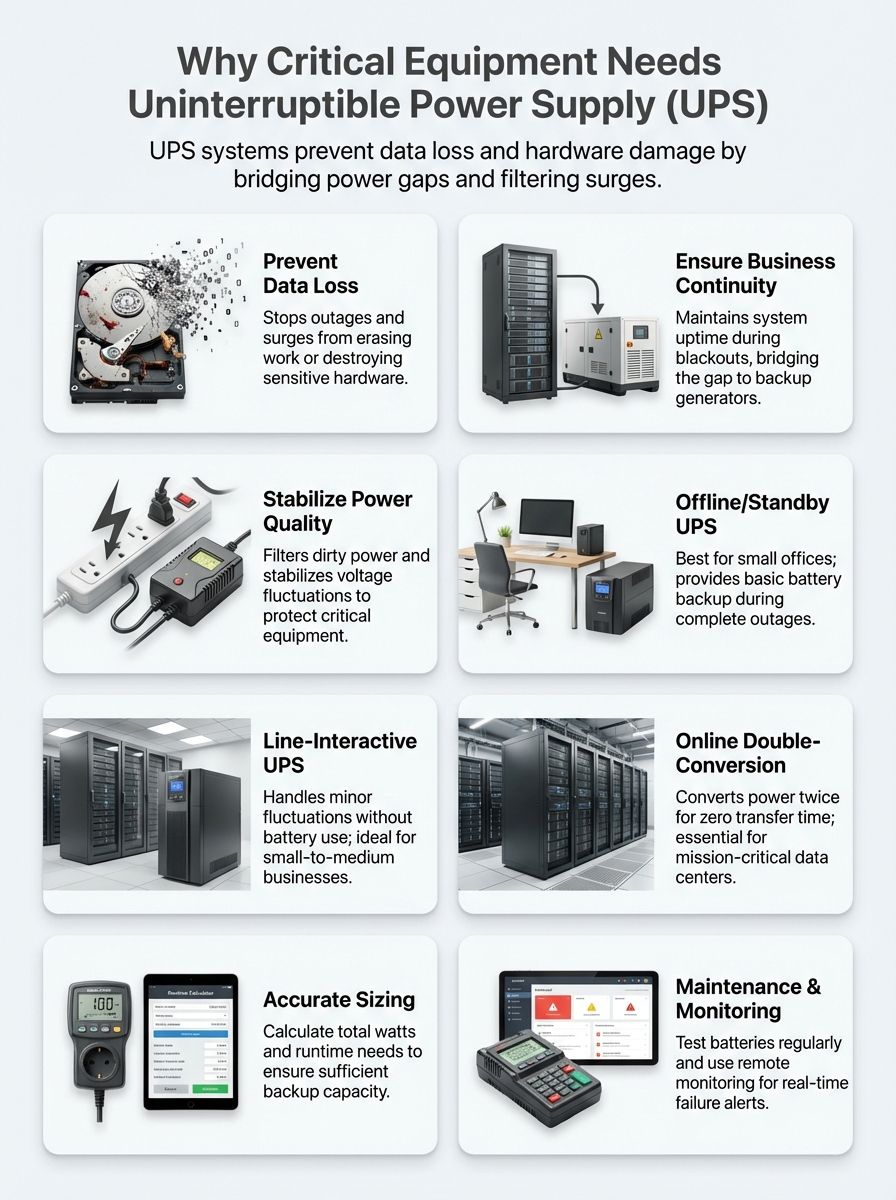
Key Benefits of Uninterruptible Power Supply (UPS)
The key benefit of an uninterruptible power supply is simple: it buys time and stability when the power supply turns unstable, long enough to save data, keep critical loads running, and hand off safely to backup generators.
In practice, a UPS protects equipment through three layers working together: stored battery backup, surge protection and filtering, and an inverter path that maintains usable AC power even when the input power source sags or drops.
- Time to react: automatic, controlled shutdowns and clean cutover to a backup generator.
- Power conditioning: voltage regulation and filtering that reduces stress on power supplies, motor drives, and sensitive electronics.
- Operational control: remote monitoring and event logs that turn power problems into actionable alerts.
- Business continuity: fewer crashes, fewer corrupted files, and fewer surprise repairs.
Prevents Data Loss and Hardware Damage
A UPS prevents data loss by keeping systems alive long enough to save work, flush caches, commit writes, and shut down in the correct order instead of crashing mid-operation.
It also protects hardware by reducing the “dirty power” events that silently shorten component life, including power surges, undervoltage (brownouts), and repeated on-off cycling.
Transfer time is a practical detail teams can measure, not a marketing claim. Intel’s 2024 ATX12VO desktop power supply design guide lists a required hold-up time of 12 ms (and a recommended 17 ms), which helps explain why a slower cutover can still reboot a desktop computer even when the UPS “worked.”
- Action: if a load is sensitive (servers, storage, network gear, medical equipment), favor online double-conversion UPS to avoid transfer-time risk.
- Action: if using standby or line-interactive UPS, test real failover behavior with the actual load, not a lamp or a single monitor.
We monitor battery health across VRLA, flooded cell (VLA), and lithium-ion systems because a weak battery string can turn a power outage into a hard power failure at the worst moment.
Ensures Business Continuity
A UPS supports business continuity by keeping systems running long enough to ride through short events and manage longer ones with a controlled shutdown or generator handoff.
That matters because “most outages are short” is not the same as “short outages are harmless,” especially for data centers and critical systems with high restart costs.
Uptime Institute’s annual outage analysis has repeatedly shown that significant outages are expensive, with a majority of surveyed operators reporting their most recent serious outage costing more than $100,000, and a meaningful share reporting losses above $1 million.

| UPS size (typical) | Where it fits | What it usually solves |
|---|---|---|
| 500VA to 1500VA | Small offices, single racks | Short backup power for orderly shutdown (often 5 to 20 minutes) |
| 1500VA to 3000VA | Server rooms, edge sites | Runtime for safe shutdown or generator start (often 10 to 30 minutes) |
| >3000VA | Enterprise rooms, industrial control | 15 minutes to hours with scalable battery cabinets |
We design redundancy with N+1 and 2N configurations when the business impact justifies it, then prove it with runtime tests, alarm validation, and documented battery replacement windows.
A UPS plan is only as strong as its maintenance. Battery backup and remote monitoring keep critical systems online, but batteries must be tested and replaced on schedule.
Protects Against Power Surges and Spikes
A UPS protects against power surges and spikes by either clamping or filtering transients and, when needed, switching the load to battery power so equipment sees stable output instead of a damaging waveform.
Surge protection is not the whole story, though. Input harmonics and poor power factor can overheat wiring, trip breakers, and force generator oversizing, which becomes a hidden cost during longer backup power events.
| Rectifier approach (common in online UPS) | Typical input current distortion (THD(i)) | Why it matters |
|---|---|---|
| Basic 6-pulse rectifier | About 25% to 30% | Higher harmonics can stress upstream power distribution and generators |
| 12-pulse rectifier | About 8% to 12% | Lower harmonics, often used in larger installations |
| Active front end (IGBT) designs | Low single digits, sometimes around 2% to 5% | Cleaner input current, simpler generator integration, often less derating |
We follow IEC 62040-2:2016 EMC expectations during design and commissioning, then confirm the real-world result with event logs and power-quality measurements, not guesswork.
- Action: if a site relies on a backup generator, evaluate UPS input harmonics and charging behavior during generator operation, not only on utility power supply.
- Action: validate that surge protection exists at the right layers, including upstream SPDs and rack-level protection where needed.
Enhances Safety and Security
A UPS enhances safety by keeping essential loads running in a predictable way and reducing abrupt shutdowns that can create hazards in healthcare, industrial, and security systems.
Battery safety is the part teams skip until a failure forces attention. Schneider Electric India notes that most VRLA UPS batteries last about three to five years, and it also gives a practical rule: roughly every 8°C rise above the ideal operating range can cut battery life in half.
- Action: keep UPS batteries in a controlled environment (and measure actual battery temperature, not only room temperature).
- Action: avoid mixing new and old batteries in the same string, and replace large arrays in groups to reduce imbalance.
- Action: confirm ventilation and follow manufacturer guidance for end-of-life replacement to reduce gas and odor risks from aging batteries.
For outdoor and remote sites, we match enclosure and battery strategy to local conditions, including heaters for cold locations and fans or cooling for hot racks, because temperature swings drive battery health decline fast.
Reduces Downtime and Associated Costs
A UPS reduces downtime by preventing the two most expensive outcomes of power problems: uncontrolled shutdowns and chaotic restarts.
In data centers, a short power outage can still create long downtime if it causes storage checks, database recovery, or manual intervention across clusters.
For larger critical loads, rotary and diesel rotary UPS (DRUPS) systems can provide mechanical ride-through measured in tens of seconds while generators come online. Industry references often cite ride-through in the 15 to 40 second range, which is enough to bridge generator start and stabilize output frequency in many designs.
- Action: if a facility uses generators, test the entire chain: UPS on battery, generator start, UPS recharge behavior, and transfer switch sequencing under load.
- Action: track downtime cost drivers in post-incident reviews so the next UPS investment targets the real weak point (batteries, switchgear, monitoring, or procedures).
Common Power Problems Addressed by UPS
UPS systems address the power problems that most commonly break critical equipment: power outages, voltage fluctuations, and power surges.
We select the UPS topology based on which problem is most frequent at the site, then validate performance with runtime tests, alarm tests, and event logs.
Power Outages
Power outages remove the utility power supply without warning, and even a brief outage can crash systems that have no battery backup or ride-through margin.
A UPS supplies backup power long enough to start a backup generator, transfer to generator power through a transfer switch, or shut down cleanly.
Schneider Electric India explains transfer time in practical terms: line-interactive units vary by sensitivity (about 2 to 10 ms), while double-conversion online UPS has no transfer time during an input AC failure.
- Action: if an outage triggers unexpected reboots, reduce transfer time risk by moving sensitive loads to online UPS or raising device hold-up margins.
- Action: confirm that the generator start signal and the transfer switch logic work during a real outage, not only in a simulated test.
For planning math, we still convert loads into amps when it helps: a 1000W device at 120V draws 8.33A, and during a brownout at 100V it draws 10A for the same power, which stresses battery backup faster.
Voltage Fluctuations
Voltage fluctuations damage equipment slowly by overheating power supplies and creating repeated undervoltage and overvoltage stress that never shows up as a clean “outage.”
For India sites, we plan around a 230V ecosystem and a distribution reality where swings happen. A published standards-of-performance example from an Indian electricity department lists low-voltage variation targets of +6% and -6% at the point of commencement of supply, which helps teams set realistic voltage regulation expectations for critical loads.
Line-interactive UPS units use automatic voltage regulation to handle many sags without draining batteries. For example, a common 230V line-interactive UPS specification lists a wide input voltage range for mains operation, such as 160V to 286V, with an extended adjustable window that can reach roughly 151V to 302V on some models.
- Action: check the UPS input voltage window and AVR behavior, then compare it to your site’s measured low and high voltage events.
- Action: if the site sees frequent deep sags, prioritize online UPS and consider upstream voltage regulation and distribution upgrades.
Power Surges and Spikes
Power surges and spikes can destroy electronics instantly or create latent damage that shows up later as unexplained failures.
A UPS helps by filtering and clamping many transient events, then switching to battery power when the input becomes unsafe.
We enable monitoring and event logging so surge events do not stay invisible. IEC 62040-2:2016 frames EMC expectations for UPS in different environments, which reinforces the need to commission with the complete system in mind, including communications ports and networked monitoring.
- Action: treat surge protection as a layered system, with upstream protection at the panel and targeted protection for racks and sensitive circuits.
- Action: if a site has solar inverter or photovoltaic system equipment, confirm coordination between inverter protection, UPS behavior, and site grounding to avoid repeated nuisance events.
Types of UPS Technologies
The best UPS technology depends on what the load can tolerate: transfer time, waveform quality, and how tightly the output must be controlled during power fluctuations.
IEC 62040-3 classifies UPS output performance into VFD, VI, and VFI categories, which is a useful way to compare designs across brands.
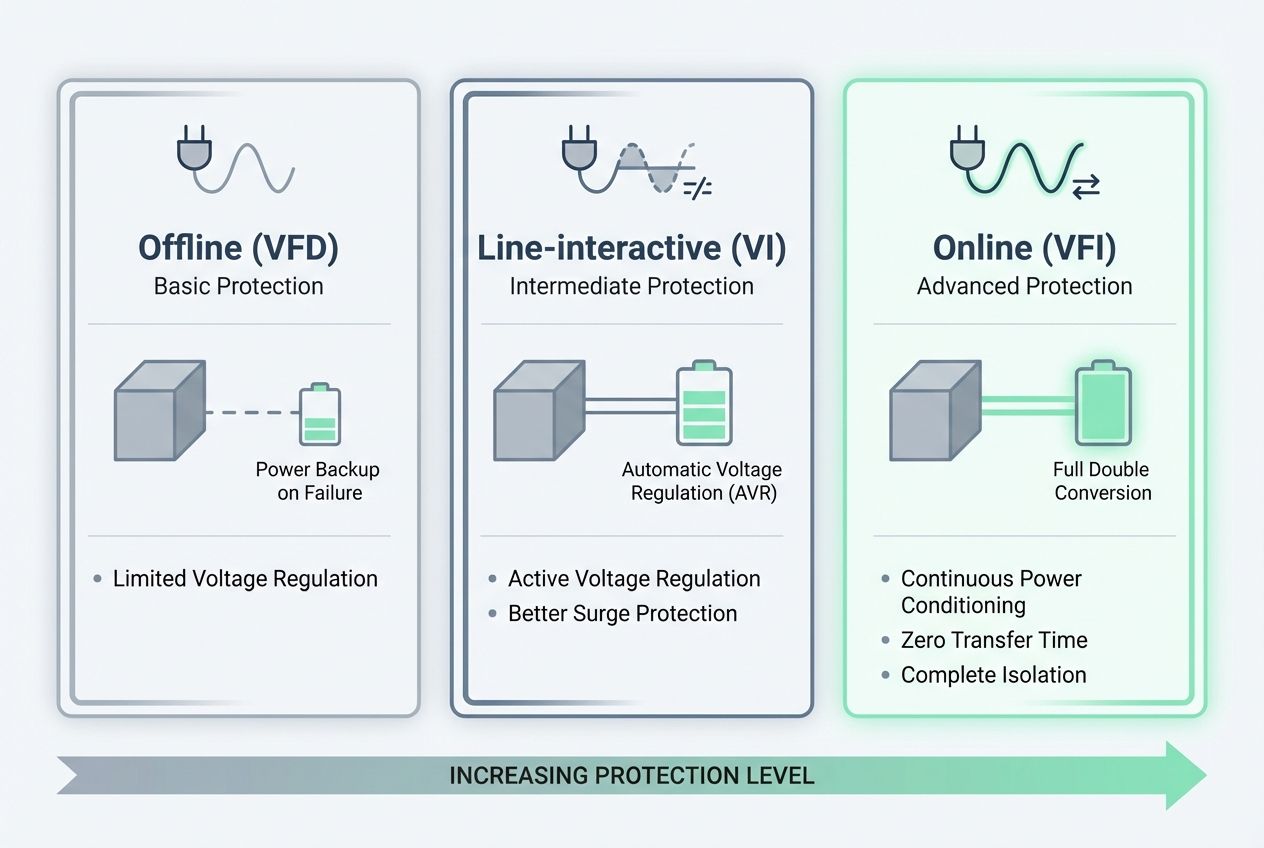
| UPS type | IEC 62040-3 class (common) | Transfer time | Best fit |
|---|---|---|---|
| Offline (standby) | VFD | Milliseconds, varies by model | Single PCs, basic edge loads |
| Line-interactive | VI | Low milliseconds, adjustable by sensitivity | SMB racks, networks, server rooms with moderate power issues |
| Online double-conversion | VFI | No transfer time in normal operation | Data centers, hospitals, industrial controls |
Offline/Standby UPS
An offline (standby) UPS is the simplest option, and it is mainly used to keep a single desktop computer or small load alive long enough to save work and shut down.
It passes utility power through until a power outage, then switches to battery backup using an inverter.
- Action: use standby UPS for non-critical loads where a short transfer time and a simpler waveform are acceptable.
- Action: avoid standby UPS for sensitive servers, storage, and medical equipment where waveform and transfer behavior matter more than purchase price.
When we evaluate standby units, we test with the real load, since some cheaper designs output a stepped waveform on battery that can stress certain power supplies and inductive loads.
Line-Interactive UPS
A line-interactive UPS is often the practical middle ground for small-to-medium business racks because it can regulate voltage without using batteries for every minor dip.
It typically offers better voltage regulation than standby UPS and often ships with management options like USB or a network card add-on for remote monitoring.
- Action: choose line-interactive UPS when voltage fluctuations are common but tight frequency regulation is not required.
- Action: tune sensitivity settings after commissioning, since sensitivity can change transfer behavior and nuisance switching.
We also check the input window and regulation range against site logs, because the best VA rating still fails if the UPS drops to battery too often and ages the batteries early.
Online/Double-Conversion UPS
An online double-conversion UPS delivers the highest level of protection because the inverter continuously supplies clean AC output, isolating the load from many input power source problems.
This design protects against power outages, power surges, and power fluctuations, and it also helps with frequency variations and waveform distortion.
- Action: use online UPS for data centers, medical equipment, industrial controls, and any environment where even a brief interruption can cause a crash.
- Action: confirm efficiency and heat impact in the room plan, since higher protection can also mean more heat to manage.
For environments that depend on backup generators, we validate charging current behavior and harmonics, since those details influence generator sizing and transfer stability.
How to Choose the Right UPS for Critical Equipment
Choosing the right UPS starts with a realistic load profile, a clear runtime target, and a plan for monitoring and generator integration.
We also confirm compliance expectations early, because it affects procurement, documentation, and acceptance testing.
In India, BIS has published updated safety alignment for uninterrupted power supply equipment under IS 16242 (Part 1):2025 aligned to IEC 62040-1:2017, with an implementation timeline referenced as 19 November 2026 in 2025 updates, so teams should ask vendors what standard edition their models are certified against.
Assess Power Requirements
Assess power requirements by measuring real power consumption in watts and apparent power in VA, then adding headroom for growth and inrush.
- Catalog each device’s power consumption and sum totals. If a device lists only amps, convert using your supply voltage (many India sites use 230V single-phase or 415V three-phase for larger loads).
- Convert VA to watts using power factor when needed, since a 1500VA unit is not always a 1500W unit.
- Set a runtime target based on what the site needs, either graceful shutdown or generator start and stabilization.
- Plan redundancy (N+1 or 2N) where downtime risk is high, then ensure each path has enough capacity during maintenance.
- Confirm form factor early (tower vs rack mount), and verify rack depth, airflow, and cable routing before purchase.
- For sensitive loads, specify online double-conversion UPS and document why, so the decision survives procurement pressure.
- If integrating renewable sources, map dc power and inverter paths so the UPS does not fight the solar inverter or create nuisance transfers.
- For very large loads, evaluate rotary UPS or DRUPS where it fits the facility strategy, then validate transfer switch sequencing with the generator under load.
Evaluate Battery Life and Efficiency
Evaluate battery life and efficiency by treating batteries as consumables with a predictable replacement window, not as “install and forget” parts.
- Estimate runtime using real load and battery behavior, since higher load reduces battery power faster than most teams expect.
- Choose battery chemistry to match the environment: VRLA is common, lithium-ion can reduce footprint and replacement frequency in many deployments.
- Schedule battery tests every 6 to 12 months and keep the results, because trend lines often predict failures before alarms do.
- Avoid mixing new and old batteries in series or parallel strings, since imbalance can reduce capacity and create overheating risk.
- Account for efficiency losses in planning, since conversion losses turn into heat that the site must remove to protect battery health.
- Use temperature management as a battery strategy. Schneider Electric India notes most VRLA UPS batteries last three to five years, and it also warns that higher operating temperature can cut life dramatically.
- Confirm recharge time and generator sizing together, because fast recharge after an outage can be a major load on a backup generator.
Consider Remote Monitoring and Management Capabilities
Remote monitoring turns a UPS from a “box under the rack” into an управляемый part of the business continuity plan.
- Choose UPS models with network monitoring options that support secure SNMP (including SNMPv3) so alerts and logs reach the right team fast.
- Use power management software to automate orderly shutdown and restart sequencing, so servers do not corrupt data during a power outage.
- Connect monitoring to facility operations so alarms route to the people who can act, not only to IT dashboards.
- Add environmental sensors where heat and humidity are risks, since battery backup performance depends heavily on temperature stability.
- Test alerting end-to-end, including battery health alarms, overload alarms, and generator start events.
- Document the response playbook so on-call teams know which alarms require immediate action and which can wait for business hours.
Applications of UPS in Critical Environments
UPS applications are clearest in critical environments where downtime or data loss creates financial, safety, or regulatory risk.
We align topology to the environment: online UPS for the most sensitive loads, line-interactive UPS for stable operation at the edge, and carefully engineered generator integration for long-duration events.
Data Centers and IT Equipment
Data centers rely on UPS systems to keep compute, storage, and network layers stable through disturbances that are too fast for generators and too disruptive for fragile IT stacks.
India’s data center market is also concentrating capacity in specific metros, which influences how teams think about redundancy, spare parts, and service response. A 2025 market report cited by The Economic Times described Mumbai as holding a large share of the country’s data center capacity and crossing a 4 GW milestone in capacity figures referenced in that coverage.
- Action: design for maintainability, including bypass paths, battery replacement access, and clear runbooks for maintenance windows.
- Action: implement remote monitoring and event correlation, then review event logs after every major power incident.
For rack-mount IT gear, smaller UPS units can provide the 5 to 20 minute window needed for graceful shutdown or generator start, while larger online UPS plants support continuous operation and tighter voltage regulation.
Medical Devices and Healthcare Facilities
Healthcare facilities use UPS protection to keep life support, imaging, lab systems, and essential IT online through power problems that could impact patient care.
We favor online UPS for loads that cannot tolerate even a brief interruption, and we design for safe alarm visibility, controlled shutdown options, and reliable generator handoff for extended events.
- Action: separate critical and non-critical loads so battery runtime is reserved for medical equipment that truly needs it.
- Action: test alarms, runtime, and generator transitions during scheduled drills so the first test is not a real emergency.
Industrial and Manufacturing Operations
Industrial environments use UPS systems to protect process controls, PLCs, instrumentation, and motor driving and motor drive control systems from power failure events that can trigger unsafe states or costly downtime.
We often see industrial sites benefit from strong input conditioning and monitoring because harmonics, switching events, and large inductive loads can create repeated power fluctuations.
- Action: coordinate UPS selection with upstream distribution, grounding, and surge protection so the UPS is not asked to “fix” a wiring problem.
- Action: validate that battery backup and bypass arrangements support safe shutdown of critical processes, not only IT shutdown.
For high-power sites, rotary or DRUPS designs can fit well when the facility already supports mechanical maintenance regimes and wants ride-through without large battery banks.
Conclusion
We protect critical equipment with an uninterruptible power supply that delivers stable power supply output during outages, surges, and voltage fluctuations.
Battery backup, voltage regulation, and surge protection reduce data loss and hardware damage, while remote monitoring and maintenance keep the system trustworthy.
When we match UPS topology to the load and integrate it cleanly with a backup generator and transfer switch, downtime drops and business continuity gets easier to defend.
FAQs
1. What does an uninterruptible power supply do for critical equipment?
It gives backup power and battery backup when the utility power supply fails. It keeps critical systems running and prevents data loss, until a backup generator or other emergency power kicks in.
2. How does an uninterruptible power supply protect against power surges and fluctuations?
It provides surge protection and voltage regulation, smoothing power fluctuations and blocking power surges to protect sensitive gear in data centers and medical equipment.
3. Are there different types of uninterruptible power supplies and how do they differ?
Yes. An online uninterruptible power supply converts and supplies clean dc power without gaps. A line-interactive uninterruptible power supply corrects voltage swings, and a standby uninterruptible power supply switches to battery backup during power problems.
4. How does an uninterruptible power supply help with data loss prevention in data centers?
It keeps servers up during a power outage and lets systems shut down safely, cutting the risk of data loss. It also links to remote monitoring to track battery health and power consumption.
5. Can an uninterruptible power supply save money and reduce downtime?
Yes, it prevents costly downtime and reduces damage from power failure, giving cost savings and better business continuity. It also adds power protection to your overall power backup solutions.
6. How do I choose and maintain an uninterruptible power supply for critical equipment?
Match capacity to your input power source and load, check ups batteries and plan for backup generator integration, and run routine tests of battery health and emergency power while using remote monitoring; consider photovoltaic system or solar panel options if you add renewable power.