
The core safety principle for uninterruptible power supplies is simple: you are bringing a rechargeable battery and a high-current power supply into your home or office, so you must control heat, ventilation, and electrical protection.
If you follow a methodical setup, UPS units are not inherently dangerous, even during a power outage.
This lesson breaks the job into repeatable steps: choose a compliant model, install it correctly, manage the internal battery, verify surge protection, and use reliability indicators like mean time between failures (MTBF) the right way.
This guide is organized in three stages: identify hazards, apply safe usage practices, then confirm the benefits and protection you should expect during power failures.
Key Takeaways
- Buy models that clearly state compliance with recognized UPS safety standards (in India, look for BIS compliance aligned to IS 16242 and the IEC 62040 series) and never open the case unless the manufacturer explicitly allows user-service battery access.
- Plan battery replacement instead of waiting for a failure: sealed lead acid batteries often land in a 3 to 5 year window, and high ambient heat can shorten that timeline.
- Control heat first: keep the UPS upright on a hard surface, keep vents unobstructed, and avoid tight cabinets or soft furnishings that trap warm air.
- Use layered protection: proper earthing, earth-leakage protection where applicable, and surge protection at the right point in the electrical system reduce electric shock and fire hazards.
- Test what matters: confirm load, runtime expectations, and graceful shutdown settings so your UPS protects data, not just electricity.
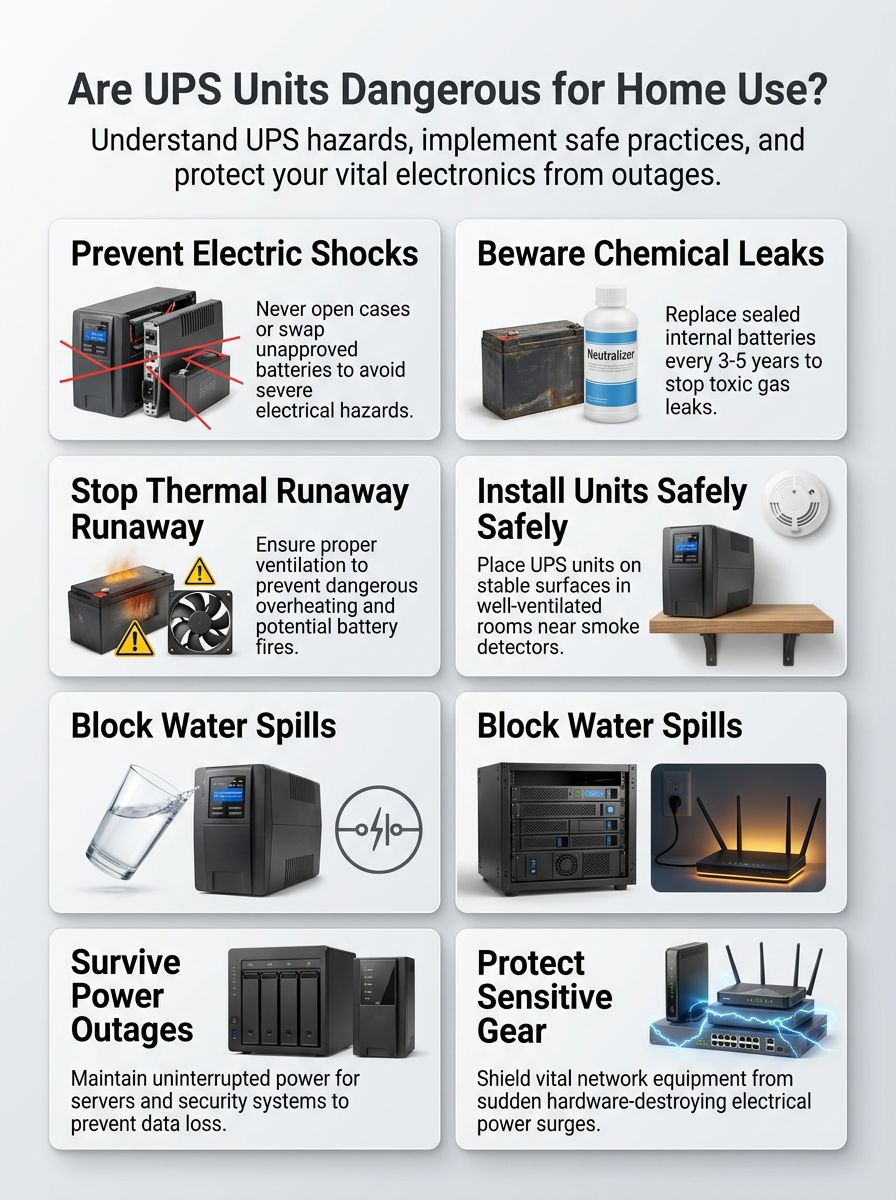
Common Hazards of Uninterruptible Power Supplies
Uninterruptible power supplies can be safe for daily home and office use, but they still concentrate risks into one box: mains power, inverter electronics, and an internal battery.
Your goal is to prevent the four failure paths that cause most incidents: electric shock from improper grounding or tampering, chemical exposure from battery damage, overheating from poor airflow, and fire hazards from overloads or battery failure.
Start by treating the UPS as safety-tested equipment, not a DIY battery project. In India, compliance is often tied to BIS requirements aligned with IS 16242 and the IEC 62040 safety framework, which is designed for UPS-specific electrical and thermal tests.
- Shock risk: rises with loose plugs, missing earth, wet areas, and user modifications.
- Chemical risk: rises with battery age, swelling, overcharging, and physical damage.
- Heat risk: rises with high room temperature, blocked vents, and constant heavy loads.
- Fire risk: rises with poor ventilation, overloaded output, and failed battery management.
Electrical shock risks
Treat the UPS as sealed equipment. Do not open it or modify internal wiring or battery connections unless the manufacturer documents it as a user-service step.
Most consumer UPS units pose low shock risk when you keep the enclosure closed and use a properly earthed outlet. The danger spikes when you defeat built-in protections by using adapters, damaged plugs, or unapproved repairs.
In Indian homes and offices, the practical risk is not only the battery. It is also the available fault current from the wall socket, combined with a weak earth connection or a loose contact that heats up under load.
- Plug into a grounded wall outlet, and avoid extension cords for the UPS input unless the manufacturer permits it for your exact model.
- Keep the earth pin intact. Do not use two-pin conversions that remove earthing.
- Separate “battery-backed” from “surge-only” loads. High-inrush devices can trigger overload protection or heat the UPS internally.
- Do a quick physical inspection monthly: cracked plugs, discoloration, loose sockets, and hot-to-the-touch cords are immediate stop signals.
If you need to check for wiring issues, use a qualified electrician. India’s Central Electricity Authority safety regulations include requirements around earthing and earth-leakage protection, and those protections matter more than any single UPS feature.
Battery leakage and chemical exposure
UPS batteries are usually sealed lead acid (often VRLA, which is a type of sealed lead acid) or lithium-ion. Both chemistries can fail safely when managed well, and both can fail dangerously if abused or left to age unnoticed.
Lead acid batteries contain sulfuric acid, and damaged units can leak electrolyte. Charging can also generate hydrogen gas, which becomes a fire and explosion hazard if it accumulates.
Safety guidance for battery charging notes hydrogen’s lower explosive limit is about 4% by volume in air, which is why ventilation is not optional in cramped spaces.
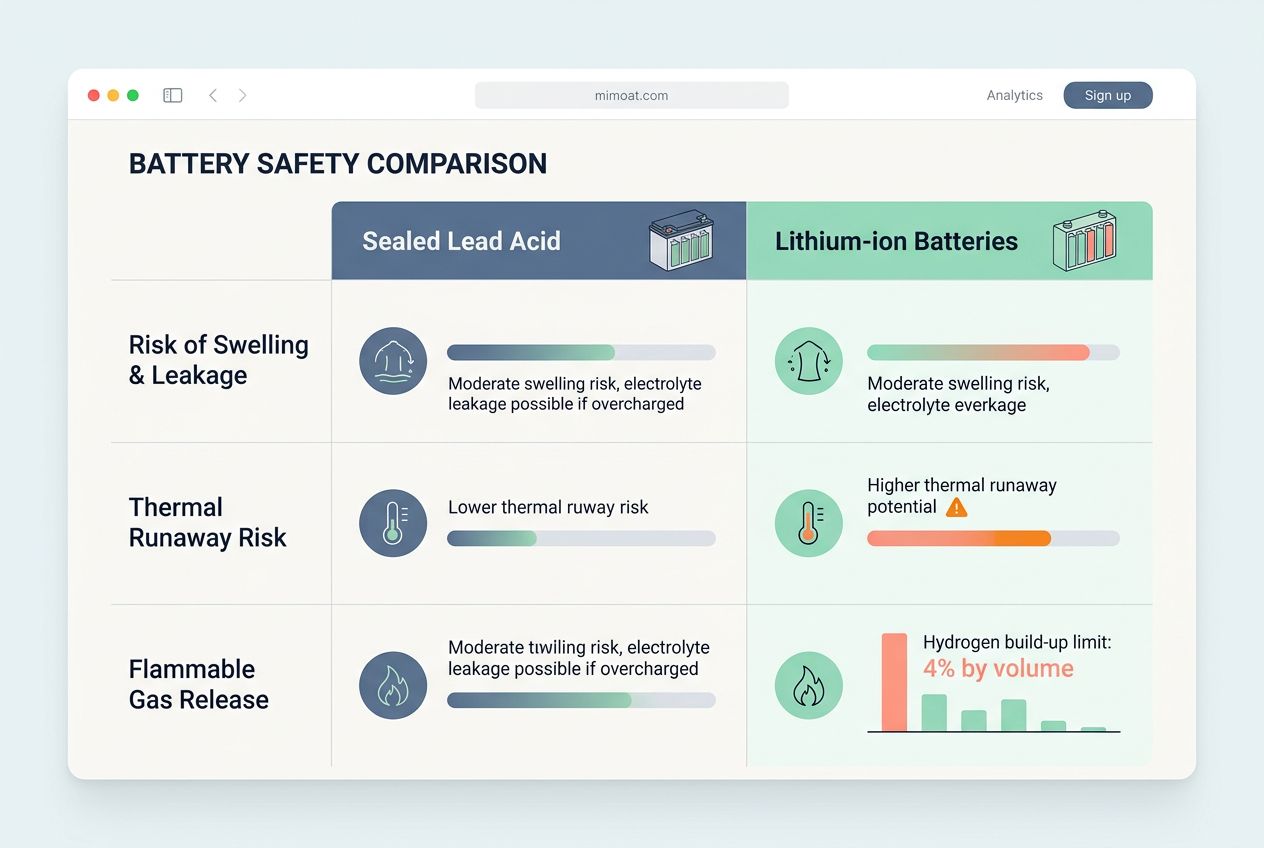
| Battery type | What can go wrong | What you do to reduce risk |
|---|---|---|
| Sealed lead acid (VRLA, sealed lead acid) | Swelling, leakage, reduced runtime, corrosion at terminals, hydrogen release during charging | Keep the UPS cool and ventilated, replace aging packs on schedule, and stop using the unit if you smell a strong “rotten egg” odor or see bulging |
| Lithium-ion batteries | Thermal runaway under abuse or internal failure, rapid heat release, re-ignition risk | Prioritize ventilation, avoid physical impacts, follow manufacturer limits strictly, and keep the area clear for emergency access |
Do not mix battery types or capacities, and do not install “close-enough” replacements. Use only manufacturer-approved replacement parts because battery protection, charging profile, and temperature sensing are designed as a matched system.
- Replace before failure: many manufacturers and service providers treat 3 to 5 years as the planning window for sealed lead acid battery replacement, depending on temperature and use.
- Watch for early warning signs: swelling, new buzzing from the charger, unusual heat on the battery side panel, or repeated self-test failures.
- Protect your lungs and eyes: if you suspect leakage, ventilate the area, avoid direct contact, and arrange safe disposal through approved channels.
Overheating and fire hazards
Heat is the silent multiplier for UPS risk. A UPS generates heat while charging, while running on battery power, and even while idling in a warm room.
If you trap that heat in a cabinet or against soft furniture, you raise internal temperatures and stress the internal battery. That increases the chance of failure and can turn a minor fault into a fire hazard.
Battery life also tracks temperature. A widely used rule of thumb in sealed lead acid guidance is that roughly each 8°C rise in operating temperature can cut sealed lead acid battery life in half, so cooling and airflow are safety actions, not comfort upgrades.
- Give the UPS breathing room: keep all intake and exhaust vents clear, and do not place items on top of the unit.
- Keep it off soft surfaces: avoid beds, carpets that block vents, and couches where heat builds and smoke goes unnoticed.
- Do not overload: overload protection helps, but repeated overloads create heat cycling that weakens components.
- Set a “hot room” plan: if the UPS lives in a non-air-conditioned space, shorten battery replacement intervals and test runtime more often.
If a UPS battery compartment swells, smells sharp or sulfur-like, or feels unusually hot, disconnect the load safely, switch off the unit, and move to a ventilated area if you can do so without risk.
For emergency readiness, keep a smoke alarm nearby and maintain clear access to the unit. Fire guidance for lithium-ion incidents often emphasizes cooling and the risk of re-ignition, so your plan should prioritize evacuation and calling local emergency services over trying to “win” a battery fire with a small extinguisher.
Safe Usage Practices for UPS
Safe UPS use is a process: correct sizing, correct placement, correct wiring, then simple maintenance that keeps battery replacement and ventilation on schedule.
Do this once, document it, and you remove most day-to-day risk.
- Size the UPS for watts, not only VA: add the watt draw of your connected devices, then leave headroom for peaks.
- Control heat: pick a location that stays cooler and has steady airflow.
- Install with proper earthing: use a grounded wall outlet and avoid improvised adapters.
- Set shutdown behavior: configure graceful shutdown for PCs and NAS units so the UPS prevents data loss, not just power failure.
- Schedule testing: monthly visual checks, periodic self-tests, and planned battery replacement.
Proper installation and maintenance
Start with placement. Put the UPS on a stable, level surface, keep vents unobstructed, and keep it away from direct sunlight or other heat sources.
Then focus on the electrical path. Plug the UPS into a grounded wall outlet and keep the cord routing simple so it cannot be pinched, pulled, or stepped on.
- Keep the input simple: many manufacturer safety instructions warn against using extension cords for the UPS input, and they warn against connecting surge protectors or extension cords to the UPS output.
- Separate loads: connect only the devices that truly need backup power to the battery-backed outlets.
- Plan battery replacement: sealed lead acid packs commonly land in a 3 to 5 year planning window, and you should shorten that in hotter rooms.
- Use periodic inspections: look for swelling, corrosion at terminals (if accessible), fan failure, and unusual heat during normal operation.
When you are buying for India, compliance is part of safety. BIS circulars for UPS safety standards aligned to IS 16242 (Part 1):2025 and IEC 62040-1 include an implementation timeline that was extended to 19 November 2026, so check the model’s stated compliance and registration status before you install it.
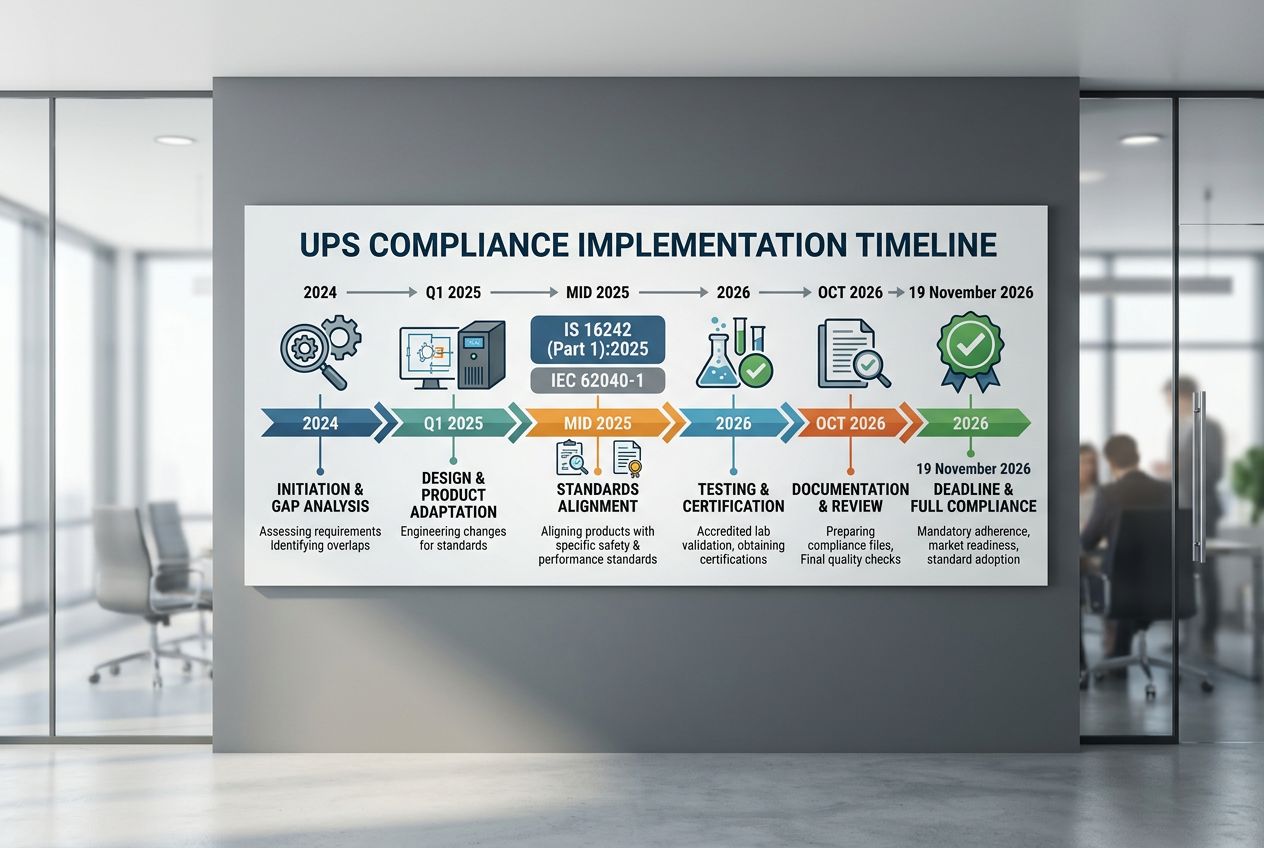
Install UPS with approved parts and follow the manufacturer’s battery replacement procedure exactly.
Avoiding water and foreign objects near the UPS
Water and metal objects turn small mistakes into electrical hazards. A single spill can short internal boards, corrode contacts, and disable the battery charging circuit that your backup power depends on.
- Keep it out of spill zones: avoid placement near kitchens, bathrooms, water dispensers, plant pots, and open windows that can blow rain inside.
- Control dust: vacuum around vents, and keep paper stacks and fabric away from intake areas.
- Prevent “fall-in” objects: do not store screws, tools, or adapters on top of the UPS.
- Move safely: switch off, unplug, and disconnect loads before relocating a unit to avoid arc flashes from loose contacts.
If you must use a cover for dust, use one that does not block airflow, and remove it during charging and normal operation.
Benefits of Using UPS Safely
A properly installed uninterruptible power supply (UPS) does more than keep a screen lit. It gives you time to save work, prevents abrupt shutdowns that damage storage, and reduces downtime from short power failures.
Safe use also protects your space: ventilation, battery replacement, and basic electrical safety checks reduce fire hazards and chemical risks while improving reliability.
| What you plug in | Why it belongs on a UPS | Typical setup tip |
|---|---|---|
| Desktop PC, workstation, monitor | Prevents data loss and file corruption during a power failure | Enable automatic shutdown so the UPS triggers a clean power-off |
| NAS, small server, router | Keeps network and storage stable, avoids abrupt disk shutdown | Use USB or network signaling so the NAS can shut down safely |
| Printers, space heaters, kettles | High inrush or high watt draw can overload and overheat the UPS | Keep these off battery-backed outlets |
Reliable power during outages
During outages, a UPS supplies battery power long enough for a controlled response. That response can be as simple as finishing a call, saving work, and shutting down, or as advanced as keeping a network online until a generator starts.
Estimate runtime with a simple method: convert your UPS battery capacity to watt-hours when available, then divide by your load in watts. Use the result as a planning estimate, not a promise, because battery age and temperature change real performance.
- Set low-battery actions: configure your computer or NAS to shut down before the internal battery reaches a deep discharge state.
- Test with a real outage drill: once or twice a year, simulate a short outage and confirm your shutdown sequence works.
- Track aging: if runtime drops sharply, schedule battery replacement instead of increasing risk by pushing old batteries harder.
Protection for sensitive devices
A UPS can help with surge protection and voltage dips, but your best protection strategy uses layers. Use surge protective devices at the distribution board where appropriate, then use point-of-use surge protection for delicate electronics.
IEC surge protection classifications are commonly described as Type 1 at service entrance, Type 2 at distribution boards, and Type 3 close to equipment. Match the protection layer to your building’s electrical design and the value of your devices, then keep the UPS focused on what it does best: stable backup power and clean shutdowns.
- Protect the right outlets: put storage and compute devices on the UPS battery-backed outlets, and keep non-critical loads on surge-only outlets if your model provides them.
- Avoid daisy-chaining: do not plug surge strips or extension boards into the UPS output unless the manufacturer explicitly allows it.
- Use reliability indicators correctly: MTBF can help compare designs, but it does not replace warranty terms, service access, and a real battery replacement plan.
Conclusion
Uninterruptible power supplies can be a safe, high-value tool for home or office backup power, but only if you treat installation and upkeep as part of the system.
Place the unit where it can breathe, keep it dry, and avoid overloads that create heat and stress the internal battery.
Plan battery replacement, verify surge protection strategy, and run a simple outage drill so your setup prevents data loss during power failures.
If you follow these steps, you reduce the main hazards and you get the dependable protection uninterruptible power supplies are meant to provide during a power outage.
FAQs
1. Are uninterruptible power supplies dangerous for home or office use?
They are not usually dangerous, they give backup power during power failures and protect your gear. Watch the internal battery, and follow health and safety regulations to stay safe.
2. What hazards come from an internal battery?
A damaged battery can overheat, leak, or catch fire, and that can cause harm. Handle batteries with care and avoid rough use.
3. How do I use uninterruptible power supplies safely?
Place them in a cool, dry spot with room to breathe, and keep them away from water and heat. Follow the maker’s instructions, meet health and safety regulations, and plan for timely battery replacement, to keep backup power ready when power failures happen.
4. Do uninterruptible power supplies need regular checks and battery replacement?
Yes, test them often, and replace the internal battery as the maker recommends, usually every three to five years. Good care keeps backup power reliable, and lowers risk during power failures.